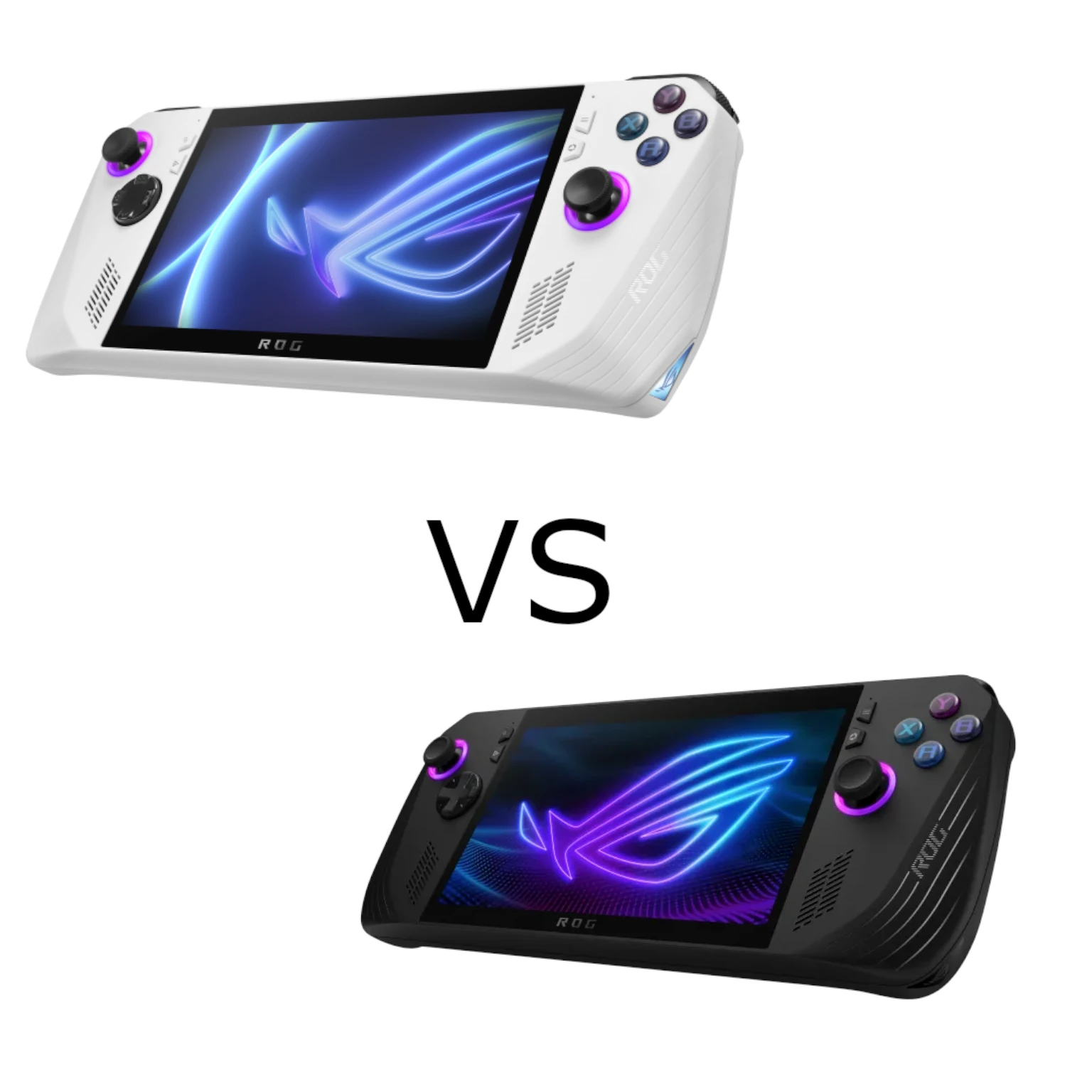
The original ASUS ROG Ally offers portable Windows gaming in two versions: Ryzen Z1 and Ryzen Z1 Extreme. This comparison covers the 2023 RC71L hardware, rather than treating later Ally models as identical. The processor is the main difference, but the right purchase also depends on the games, settings and price you have in mind.
Our view remains that the Z1 is a value option for casual players, while the Z1 Extreme suits those prioritising performance. The specifications and retained ASUS-branded charts help explain that preference. They are not TechDecode's own benchmarks, and they should not be interpreted as guaranteed results for current games or firmware.
What Are These Devices?
Both are handheld Windows PCs with integrated controllers and a touchscreen. They can run compatible PC game stores and applications, with Armoury Crate SE providing a handheld-friendly launcher and controls. Windows support gives flexibility, but does not guarantee every game runs well, has comfortable controller input or fits the device's graphics capabilities.
Think about your library before the model name. A lightweight game, a demanding native PC title and a streamed game place very different loads on the hardware. The same purchase can be excellent for one use and disappointing for another, even when both devices share the screen and controls.
What the Original Models Share
- Display: A 7-inch 1920×1080 touch display with a 120 Hz maximum refresh rate and FreeSync Premium variable-refresh support.
- Memory and storage: The original configurations use 16 GB LPDDR5-6400 memory and a 512 GB PCIe NVMe SSD.
- Battery: Both have a 40 Wh battery; capacity alone does not determine gaming runtime.
- Connectivity: Wi-Fi 6E, Bluetooth, USB-C and the original XG Mobile interface. ASUS's current Bluetooth listing is qualified by operating-system version.
- Design: The same chassis, controls and dual-fan cooling arrangement in the original Z1 and Z1 Extreme versions.
A 120 Hz screen does not promise 120 frames per second in every game. Likewise, 512 GB is an installed storage capacity, with some space used by the operating system and applications. Check the size of your own library and whether you need room for several large downloads at once.
The Processor Differences
| Specification | Ryzen Z1 | Ryzen Z1 Extreme |
|---|---|---|
| CPU | 6 cores / 12 threads | 8 cores / 16 threads |
| AMD's current architecture description | 2 Zen 4 plus 4 Zen 4c cores | Zen 4 |
| Maximum CPU boost | Up to 4.9 GHz; AMD lists up to 3.5 GHz for the Zen 4c cores | Up to 5.1 GHz |
| L3 cache | 16 MB | 16 MB |
| RDNA 3 graphics compute units | 4 | 12 |
| ASUS's original Ally graphics rating | Up to 2.8 TFLOPS | Up to 8.6 TFLOPS |
| Configurable APU power range | 9–30 W | 9–30 W |
Maximum boost is not a promise that every CPU core runs at that frequency simultaneously. AMD defines it around the maximum achievable by a single core under suitable conditions. Cooling, firmware, workload and power settings affect sustained operation. Use ASUS's installed-device specifications alongside AMD's processor description rather than mixing their clock figures without context.
The Extreme has three times the graphics compute-unit count. It does not therefore produce three times the frame rate in every title. Shared memory, CPU work, game settings and power limits affect results. The official graphics name is AMD Radeon Graphics; identifying the chips as interchangeable desktop or laptop Radeon models can obscure the Ally's configuration.
Read the Existing Charts in Context
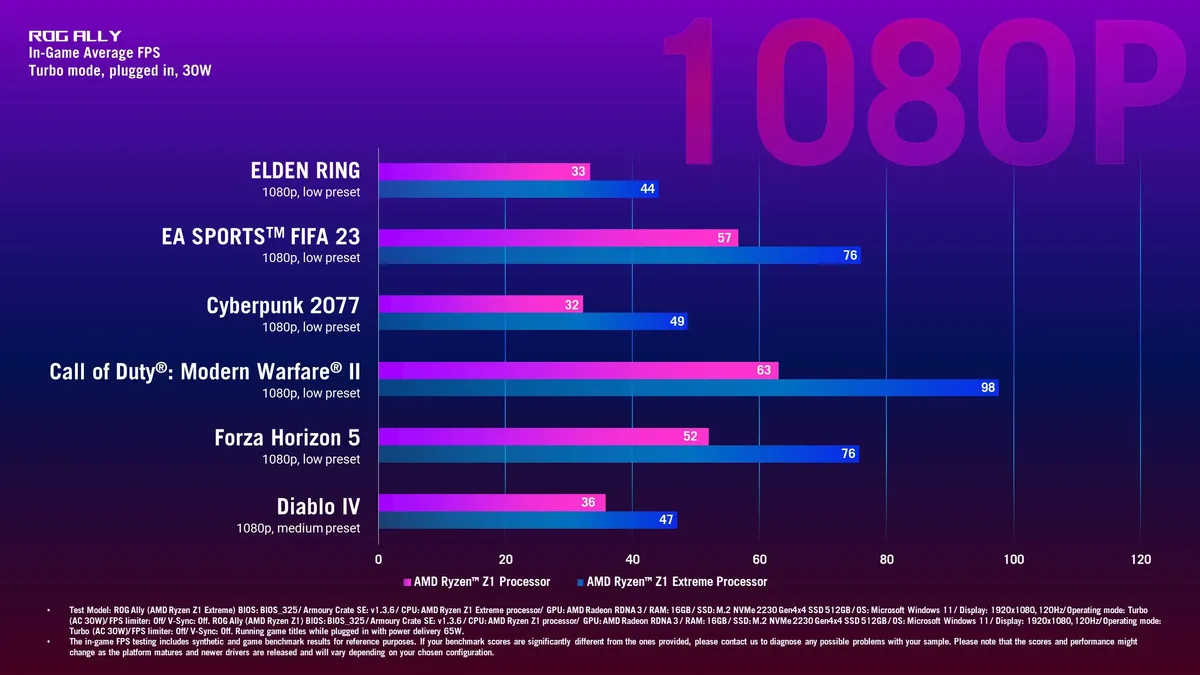
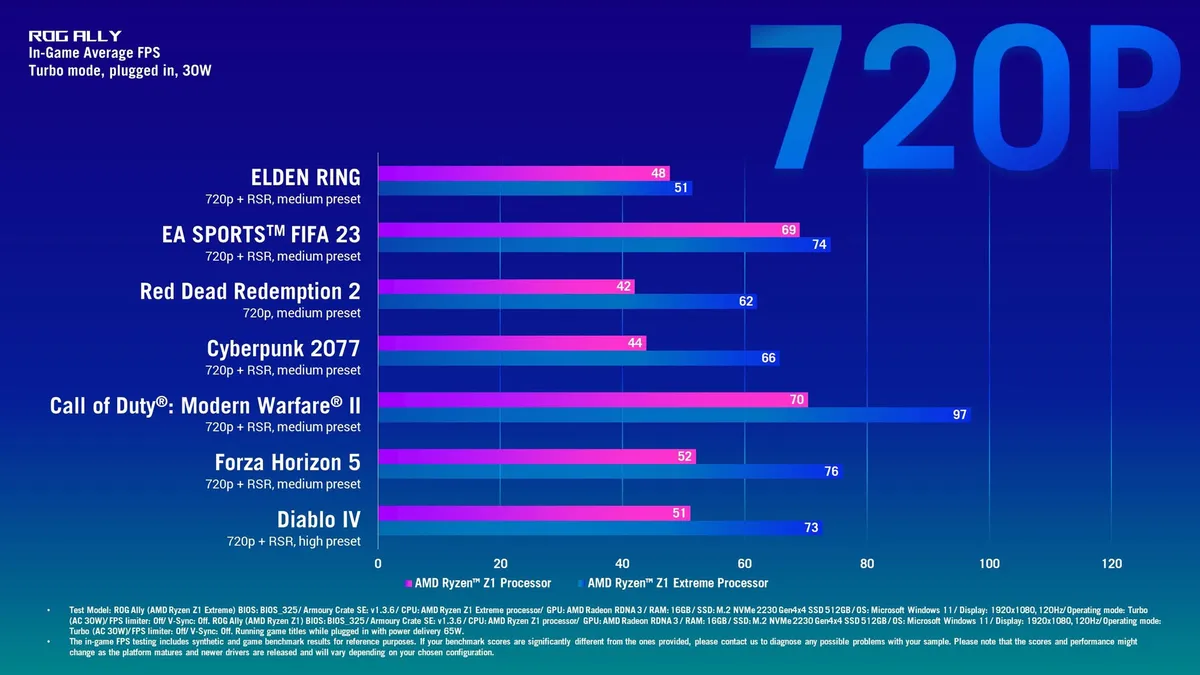
The first chart uses 1080p, mainly low presets, with a medium preset for Diablo IV. The second uses 720p with different presets, and includes Radeon Super Resolution for the games labelled “+ RSR”; Red Dead Redemption 2 is labelled 720p medium without that suffix. Both graphics specify Turbo mode, plugged in, at 30 W.
For example, the 1080p graphic shows Cyberpunk 2077 at 32 FPS for the Z1 and 49 for the Extreme in that test. In the 720p graphic, Elden Ring is 48 versus 51. These examples demonstrate that the gap changes with the workload and settings. They do not support one fixed percentage advantage for every title at both resolutions.
The footnotes identify an older BIOS and Armoury Crate configuration and describe the figures as reference results. Games and drivers change. Compare a current test of your intended title with the same power mode, resolution, preset and upscaling settings, rather than using a plugged-in launch-era chart to predict a battery session.
Battery Life: Capacity and Total Power
The standard Z1 does not automatically last longer because it has fewer cores, and the Extreme does not automatically last longer because it has more graphics resources. Both share the original 40 Wh battery. The game, frame-rate target, screen brightness, wireless activity and system power setting influence the result.
ASUS documents Silent, Performance and Turbo modes as a balance between power and performance, with the familiar 10 W, 15 W and 25 W APU settings, and up to 30 W Turbo when plugged in. Those are processor-related settings, not the complete power drawn by the display, memory, storage and rest of the handheld.
For a simplified example, 40 Wh divided by a total draw of 20 W gives two hours before accounting for practical losses and usable capacity. This is arithmetic, not a measured Ally runtime. Do not divide by a 15 W APU preset and assume it represents the whole system, or infer identical runtime just because two machines use the same preset.
Try a lower power mode or a suitable frame-rate cap for a game that has spare performance. Check the resulting smoothness and battery consumption. Reducing settings can improve efficiency, but a particular game may need more power to reach your chosen target. There is no universal 60 FPS setting that guarantees the Extreme outlasts the Z1.
Choosing by Your Games
Choose the Z1 for value when the actual price and performance meet your casual, indie or less demanding game needs. Streaming from another PC or a cloud service is also an option, subject to the service, host and network. Verify that the controller, connection and subscription requirements fit the intended use.
Choose the Z1 Extreme for performance when native games can use its additional graphics capability and the local price premium makes sense. Expect to tune demanding titles rather than assuming every modern AAA game runs at high settings in 1080p. Judge image quality, frame pacing and responsiveness together.
Checks Before Buying
Confirm the RC71L processor configuration, seller condition, battery health and included charger. Test the controls, screen, wireless connection and storage/card reader where possible. Retain room in the budget for a case or dock if you need one, and check the dock's charging and display capabilities.
The original XG Mobile connection provides a compatible external-graphics option, but it is a specialised interface. Check the exact dock generation and compatibility before buying; an ordinary USB-C hub does not provide the same GPU connection. For storage work, use ASUS's device-specific service guidance and protect your data first.
Both models remain appealing for portable PC gaming when expectations match the hardware. Keep the original choice clear: Z1 for an appropriate value purchase, Z1 Extreme for more performance headroom. The useful deciding evidence is your library at your intended settings, alongside the current price and the time you expect to spend away from a charger.