Imagine a highway at rush hour. Cars inch forward, tempers flare, and everyone longs for a smooth ride. That's what a congested network can feel like for time-sensitive applications like video conferencing or online gaming. Quality of Service (QoS) steps in as the traffic cop, helping control how competing traffic uses the capacity you have. It does not create extra bandwidth or control every network hop.
What is QoS and How Does it Work?
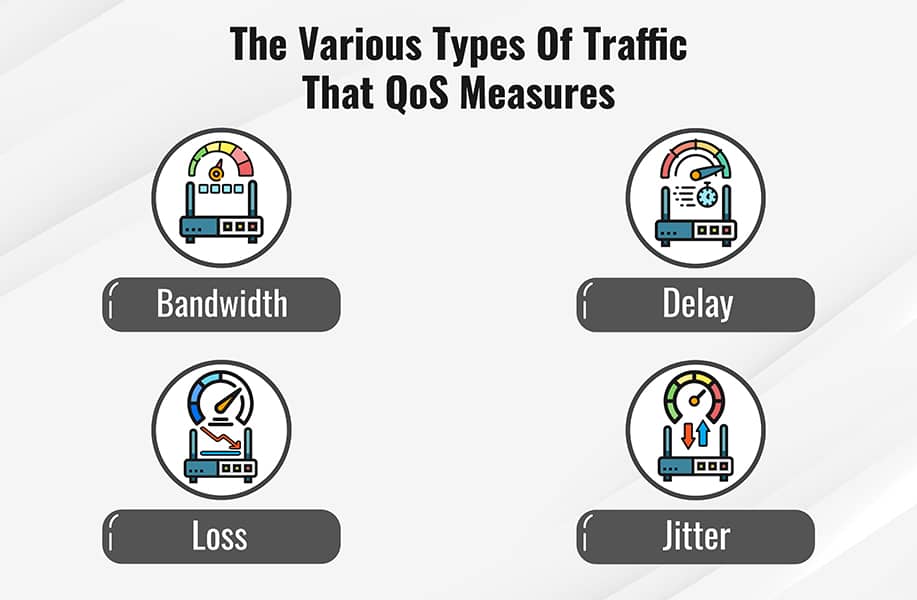
QoS is a set of technologies that manage data flow on a network. It can classify traffic, shape rates and schedule queues to manage competing demands. The result depends on the equipment, policy and bottleneck. Here's a breakdown of key terms:
- Packet: Small chunks of data sent over a network.
- Latency: The time it takes for a packet to travel from sender to receiver. Low latency is crucial for real-time applications.
- Jitter: Variation in packet delay, which can disrupt time-sensitive audio or video when it exceeds what the application can absorb.
- Bandwidth: The capacity of a connection, commonly expressed as a rate such as megabits per second; measured throughput is the usable result.
QoS achieves prioritization through various methods:
- Traffic Classification: Network devices identify different types of traffic (voice, video, email) and assign them priority levels.
- Resource Reservation: Some mechanisms reserve resources or provide configured allocations. A home-router priority setting does not reserve bandwidth across the public internet.
- Shaping: Delays packets to control the rate of a traffic class or connection, often helping keep queues at a manageable bottleneck.
- Scheduling: Determines how packets from different queues are served. Policies can use priorities, weights or fair sharing rather than always serving one class first.
Implementing QoS: A Step-by-Step Guide
The specifics of implementing QoS will vary depending on your network equipment, but here's a general roadmap:
- Identify Critical Applications: Video conferencing, VoIP calls, and online gaming are prime candidates for prioritization.
- Classify Traffic: Use your network devices to categorize traffic types based on protocols or ports.
- Prioritize Traffic: Assign priority levels to different traffic categories.
- Configure QoS Policies: Define bandwidth allocation, shaping rules, and scheduling mechanisms for each priority level.
- Monitor and Fine-Tune: Track network performance and adjust QoS settings as needed.
Examples of QoS in Action
- Enterprise Networks: Prioritize voice and video calls for seamless collaboration, even during peak internet usage.
- Online Gaming: Minimize lag and jitter for a smooth and responsive gaming experience.
- Streaming Services: May help manage contention, but playback still depends on available bandwidth, the service and the receiving device.
Hardware with Built-in QoS
- Managed Switches: May offer queue and marking controls; check the specific switch features.
- Routers: Can prioritize traffic between different networks.
- Access Points: High-end access points can manage QoS for Wi-Fi traffic.
Weighing the Pros and Cons of QoS
Pros:
- Improved performance for critical applications.
- Reduced network congestion.
- Enhanced user experience.
Cons:
- Requires configuration expertise.
- May not be effective for heavily congested networks.
- Can lead to unfair treatment of low-priority traffic if not managed carefully.
Use Cases: Where Does QoS Make a Difference?
QoS shines in scenarios where consistent performance is paramount:
- Busy office networks with heavy reliance on video conferencing and VoIP calls.
- Educational institutions supporting online learning and video lectures.
- Healthcare facilities ensuring smooth operation of telemedicine applications.
- Homes with heavy internet usage for streaming, gaming, and video calls.
Use QoS to address a measured contention problem. Good settings should improve the important application while leaving reasonable service for other users.
Find the bottleneck before changing priorities
If a call becomes unreliable only while a backup uploads, test that pattern deliberately. Compare an idle call with a call during the upload, preferably using a wired client first. Record delay, loss and throughput. This helps distinguish an overloaded internet uplink from a weak Wi-Fi connection or a problem at the destination.
A router cannot recover bandwidth that the ISP has not supplied, and its local queues do not control a distant server. Prioritising a game also does not solve a failing Ethernet link. Start with the part of the path you can measure and manage.
What smart queue management does
Large persistent queues can add delay under load, often called bufferbloat. Smart queue management combines queue handling and, in many deployments, shaping to keep the controllable bottleneck from building excessive delay.
FQ-CoDel combines flow queueing, scheduling and active queue management. It aims to limit queue delay while sharing service among flows. It does not guarantee that every interactive packet always bypasses bulk transfers or that congestion disappears.
CAKE combines shaping, active queue management, flow isolation and configurable Diffserv behaviour. Host-fairness and NAT settings can influence how traffic is grouped. Do not interpret that as an exact promise that two people receive identical bandwidth regardless of their applications and network paths.
The upstream SQM scripts document Linux implementations using HTB with FQ-CoDel or CAKE. OpenWrt provides packages for appropriate supported devices. Other router and firewall platforms have their own implementations; do not assume every product offers CAKE because it has a “QoS” menu.
DSCP markings and Wi-Fi categories
DSCP is a six-bit marking used for differentiated treatment in IP networks. A marking requests a class of service; it is not a timer that guarantees a particular latency or jitter. Devices can trust, change or ignore markings as traffic crosses administrative boundaries.
Wi-Fi Multimedia uses voice, video, best-effort and background access categories. The IETF mapping guidance explains why translating DSCP into Wi-Fi priorities requires a policy rather than assuming a direct universal mapping.
For example, EF (decimal 46) is associated with telephony treatment, while CS6 is a network-control marking and should not casually be assigned to ordinary voice apps. Even a suitable marking needs the relevant device to apply the intended queue treatment. Do not label every household application “highest priority.”
Configure one reversible test
- Save the current router configuration and identify the feature your exact firmware supports.
- Measure a stable baseline for upload and download, and identify the interface or connection that the shaper will manage.
- For a shaping setup, choose a starting rate below the consistently available capacity, with appropriate link-layer settings from the platform documentation.
- Repeat the same loaded test and check both the important application and ordinary transfers.
- Adjust one setting at a time. Restore the previous configuration if the change creates a new problem.
A fixed “90 percent” value is not a universal cure. A mobile or satellite link can vary below that rate, while an overly conservative setting can unnecessarily reduce throughput. For a stable 20 Mbps upload, testing a lower starting cap is a reasonable experiment; it still needs measurements to establish whether the controlled queue is the relevant bottleneck.
Queue processing uses resources. On some devices, acceleration or offloading paths bypass the queues you intend to manage; the configuration may need to disable or change those paths. The resulting capacity is hardware- and implementation-dependent, not a universal 300–450 Mbps ceiling.
Judge the result against the problem
For a call, look for fewer disruptions during competing traffic, not merely a higher speed-test number. For a file transfer, check whether the new sharing policy is acceptable to other users. Test uploads and downloads separately because the two directions can behave differently.
Port-based rules can be useful, but many services share ports or use encrypted connections. A port number alone does not reliably identify every application. Review the platform’s actual classification options instead of assuming all modern traffic makes classification impossible.
There is no universal instruction to enable SQM below a particular plan speed or disable it on Gigabit fibre. A fast link can still develop delay under load, and a low-capacity router may struggle with shaping. Measure the symptom, check the hardware and keep a configuration that improves the real household workload.
QoS is most useful as a measured policy with known limits. Maintain the configuration, retest after significant network changes and avoid promises of lag-free service from a single checkbox.