The Raspberry Pi 5 16GB arrived on 9 January 2025 with a launch price of $120. It was an exciting addition for developers and hobbyists who wanted more memory in the familiar Pi form factor. That price belongs to the announcement, so check current reseller pricing and the complete accessory cost before making a buying decision.
Our enthusiasm is about the extra room for demanding projects: heavier desktop use, local AI experiments and applications with larger working data sets. The key question is whether your workload needs that room. Extra RAM can make a memory-constrained task practical, but it does not automatically increase processor speed or improve an application already running comfortably within 8GB.
Why a 16GB Version?
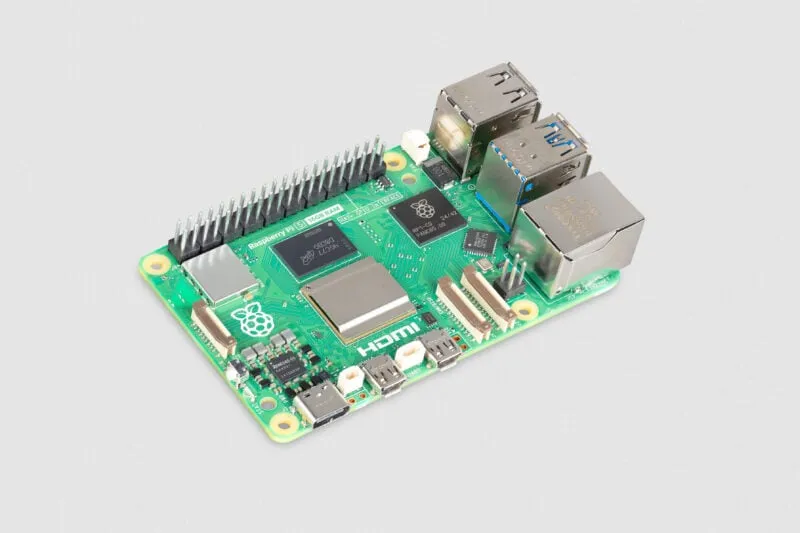
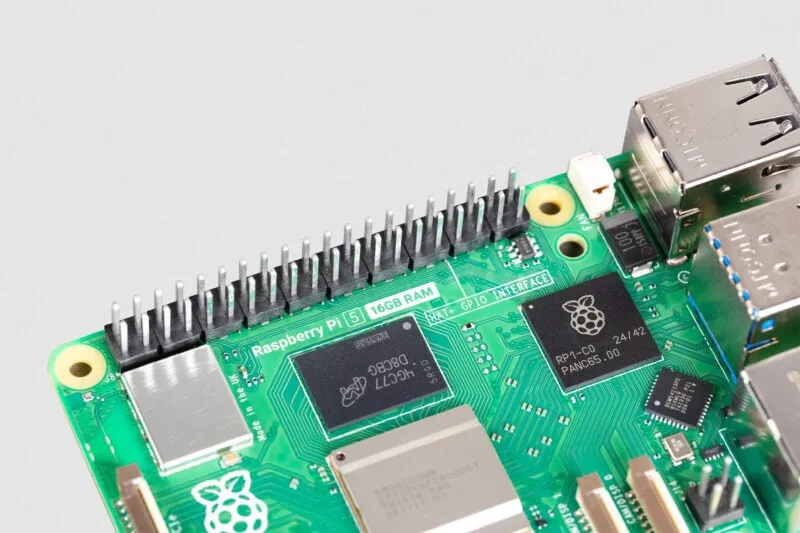
Raspberry Pi's official launch announcement specifically identified large language models, computational fluid dynamics and heavier desktop distributions as uses that could benefit. The company explained that the BCM2712 D0 processor stepping supports memory capacities above 8GB. Micron supplied a single package containing eight 16Gbit LPDDR4X dies, making the 16GB board possible.
The close-up shows a packaged memory component, rather than exposed individual silicon dies. The launch design uses D0 silicon; the useful distinction for buyers is the supported memory capacity, rather than assuming a processor stepping solely from every smaller model's RAM label. Hardware revisions can change, so use the documentation for the board you actually buy.
What Changes and What Stays the Same?
| Feature | 16GB Pi 5 | Practical meaning |
|---|---|---|
| CPU | BCM2712, four Cortex-A76 cores at 2.4GHz | Extra memory does not double the number of cores or the clock speed. |
| RAM | 16GB LPDDR4X-4267 | More capacity for applications and their working data; the transfer-rate label is not a measured application benchmark. |
| Networking | Gigabit Ethernet and dual-band 802.11ac Wi-Fi | The memory option does not upgrade the network interfaces. |
| Peripheral expansion | USB and PCIe 2.0 x1; PCIe requires an adapter | Storage choice and interface limits still matter. |
The current Pi 5 specification documents these shared platform features. Capacity and speed solve different problems. A program that repeatedly waits for its CPU may see little benefit from more RAM. A program that spends time moving needed data out to swap storage can benefit from keeping more of that data in memory. Neither outcome can be predicted from the RAM label alone.
Desktop and Development Use
For everyday computing, the appeal is being able to keep more applications or larger projects open at once. A browser, editor and development tools compete for memory alongside the operating system. Choose compatible Arm software and check the actual applications you rely on before treating a Pi as a replacement desktop. More RAM does not supply an unavailable application or turn a compute-heavy job into a quick one.
A useful check on an existing machine is to open your usual workload and inspect memory use, swap activity and CPU load together. Reproduce a busy moment, such as a build with the browser open, instead of considering only idle use. If memory pressure is the recurring limit, 16GB deserves consideration. If the job already fits with ample headroom, storage, cooling or a different processor may be a more useful investment.
Local AI and Language Models
The extra capacity makes the Pi more interesting as a place to learn about local inference. Model weights are only one part of the memory budget: the operating system, inference runtime, conversation context and other applications also need room. Quantization reduces the representation size of model data, with quality and compatibility trade-offs. A model's download size should not be treated as its complete running-memory requirement.
Ollama's documentation explains that longer contexts and parallel requests increase memory requirements. Start with a model supported by your software and a modest context, then observe the real workload. More memory allows additional options, but it neither guarantees a particular model will fit nor prevents every out-of-memory error. Generation speed remains dependent on the model, configuration and hardware; there is no universal token rate for this board.
Local execution can keep prompts on the device, which is an attractive part of the idea. Confirm that the selected model is actually running locally, though: Ollama also supports cloud features. Its documentation provides a local-only mode. Privacy depends on that choice and the surrounding application, rather than on buying the 16GB hardware.
What the AI HAT Can and Cannot Do
The original AI Kit and AI HAT+ use a Hailo accelerator for supported vision workloads. Extra Pi memory can provide room for host applications, image handling and other tasks, but it does not increase the accelerator's rated compute capability. Nor does it make every language model compatible with the accelerator. CPU-based language-model experimentation and a supported camera inference pipeline are different uses.
The current AI HAT documentation distinguishes AI HAT+ from AI HAT+ 2. The latter has its own 8GB memory and supports generative AI; the former does not offer the same LLM support. The AI Kit is now out of production. Choose the exact accessory and supported models for the project, rather than assuming any AI HAT automatically benefits in the same way from doubling host RAM.
Containers and Homelab Projects
For a homelab, 16GB offers more room to combine services, but there is no fixed maximum number of containers. A small DNS service and a photo application doing machine-learning work have very different demands. Add up their realistic working memory, allow room for the operating system and temporary peaks, and leave capacity for administration and updates. Databases and file processing also depend on storage and network performance.
Check container architecture support before planning a stack. A native Linux Arm64 image is preferable to assuming an AMD64-only image works equally well through emulation. Persistent data needs dependable storage and backups; spare RAM is not a substitute for either.
Also check hypervisor support carefully. Proxmox's official Arm64 release requires UEFI and ACPI and explicitly excludes device-tree-only hardware such as Raspberry Pi. Community Pi ports are separate projects with their own constraints. The official Arm release is not a promise that a 16GB Pi can be installed and operated as a supported Proxmox host.
Storage, Cooling and Memory Planning
Budget for a suitable power supply, storage, enclosure and cooling alongside the board. Raspberry Pi recommends its 27W USB-C supply and active cooling for demanding use. An NVMe drive needs a compatible adapter, and the official M.2 HAT+ connects through PCIe 2.0 x1. Its documented interface peak is not a guaranteed sustained transfer rate for every drive or workload.
Start with a supported operating-system image and its normal settings before applying kernel tweaks. Compressed RAM swap, such as Linux zram, stores compressed pages in memory. Its usefulness depends on how well the data compresses and the processing cost; allocating a large logical zram device does not create an equivalent amount of physical RAM. Measure the application before treating compression as a solution to an oversized workload.
Is the 16GB Pi 5 Worth It?
We see the 16GB model as a welcome step for memory-heavy experimentation, multitasking and ambitious projects in a compact computer. It is especially interesting when a project benefits from the Pi ecosystem as well as the extra memory. For a simple dedicated service or a workload already comfortable on a smaller model, the premium may be harder to justify.
Identify the application, verify Arm compatibility, estimate the whole system cost and decide which limit you are trying to remove. That keeps the appeal of the new capacity grounded in a project that can actually use it, while leaving room to explore the more demanding ideas that made this release exciting.