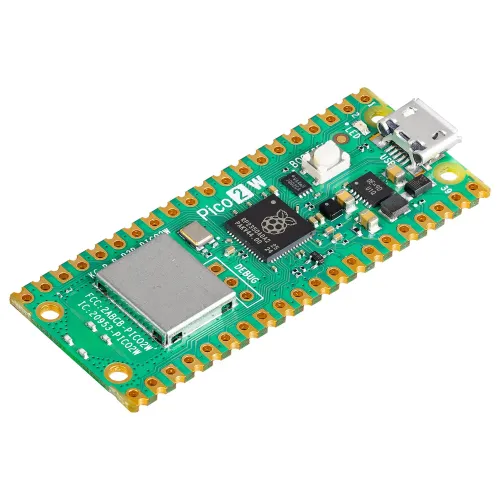
We previously looked at the Raspberry Pi Pico 2 alongside the wider Raspberry Pi family, including the Raspberry Pi 5. Pico 2 W adds the feature that makes a sensor or controller much easier to connect: an integrated wireless radio. I regard it as an appealing starting point for compact connected projects, provided the software and power requirements fit a microcontroller.
Raspberry Pi launched the wireless board on 25 November 2024 at US$7. That is a historical launch price, rather than a promise about local retail stock. It shares the RP2350 generation with the non-wireless Pico 2; the W suffix adds Wi-Fi and Bluetooth rather than changing it into a Linux computer.
Start with the Correct Board Comparison
| Feature | Pico 2 | Pico 2 W |
|---|---|---|
| Microcontroller | RP2350A | RP2350A |
| Processor choice | Cortex-M33 or Hazard3 RISC-V, two active slots, up to 150 MHz | The same RP2350 choices |
| Working memory | 520 KB SRAM | 520 KB SRAM |
| Board flash | 4 MB external QSPI flash | 4 MB external QSPI flash |
| Exposed I/O | 26 GPIO, including three ADC inputs | 26 GPIO, including three ADC inputs |
| Integrated wireless | None | 2.4 GHz 802.11n Wi-Fi and Bluetooth 5.2 |
| USB | USB 1.1 host/device | USB 1.1 host/device |
The older Pico and Pico W use RP2040, with 264 KB SRAM and 2 MB flash. Comparing an RP2040 Pico directly with Pico 2 W mixes two changes: a newer microcontroller and the wireless addition. For an existing Pico 2 project, the useful question is whether the built-in radio simplifies the design.
RP2350 does not execute four cores simultaneously. Firmware selects which architecture occupies each of two processor slots. Cortex-M33 is the default; a program must target the selected architecture. More SRAM and twelve PIO state machines create additional room for software and timed interfaces, but they do not automatically parallelise a Python script.
What the Wireless Radio Provides
The CYW43439 supplies single-band 2.4 GHz Wi-Fi 4, meaning 802.11n, and Bluetooth 5.2. It does not provide 5 GHz Wi-Fi or Wi-Fi 5. The board datasheet lists WPA3, Bluetooth Classic, BLE central/peripheral roles and a SoftAP mode supporting up to four clients. The firmware and libraries determine which of those capabilities your application actually uses.
Wi-Fi can connect a sensor to a home network or carry commands to a controller. Bluetooth can support short-range device communication. A Bluetooth version number alone does not make a finished game controller, audio device or Home Assistant proxy: each requires the appropriate application, profiles and integration support.
The onboard antenna is licensed Abracon/Proant technology. Give its end of the board free space and follow the antenna keep-out area when mounting it on a carrier. Nearby metal, an enclosure and the final position affect reception. Test the assembled device in the intended room rather than judging it from a successful connection on the workbench.
Optional Pico 2 Feature Video
For an introduction to the underlying non-wireless board, watch Raspberry Pi's Pico 2 launch video. Pico 2 W adds the wireless interface discussed here; the video is not a wireless performance test.
Choose the Runtime Before the Libraries
The official C/C++ SDK suits projects that need detailed peripheral control or debugging. MicroPython has a dedicated Pico 2 W download page with stable firmware. Hold BOOTSEL while connecting a USB data cable, then copy the matching UF2 to the drive that appears. After reboot, an editor such as Thonny can work with the interpreter.
Use Pico 2 W firmware rather than a similarly named Pico W or non-wireless Pico 2 build. CircuitPython also has a board-specific download, while the community Arduino-Pico framework offers another development route. Their libraries and APIs differ. Select the runtime that supports your sensor and communications needs, and retain your source files before reflashing.
A useful first milestone is one sensor reading correctly over USB. Next establish a wireless connection and send a small, identifiable reading. Only then add buffering, dashboards or control actions. This makes it easier to distinguish a wiring fault from a radio, library or integration problem.
Home Assistant and ESPHome: Check Current Support
Current ESPHome documentation supports RP2350 boards, including Pico 2 W. Since ESPHome 2026.7.0 its platform key is rp2; rp2040 remains a deprecated alias. The Pico 2 W board identifier is rpipico2w. Choose that board explicitly instead of copying a configuration aimed at the older Pico W.
The current Bluetooth Proxy documentation also supports the Pico W family on RP2040/RP2350 through BTstack, with the RP2 BLE Tracker required. It documents up to three concurrent active GATT connections. Passive advertisement reception is separate from those active slots. This makes a BLE proxy a documented option, while the target sensor's Home Assistant integration and the complete firmware configuration still need checking.
For a weather or room-monitoring project, decide whether you want an ESPHome-managed device or your own MicroPython/C application. A custom MQTT publisher needs a suitable library, broker configuration and a matching receiver. A MicroPython script does not automatically speak ESPHome's native API, and the Pico is not the computer running the Home Assistant server.
Turn the Project Ideas into Defined Jobs
- Environmental monitoring: Select a supported temperature or humidity sensor, check its voltage and bus connections, then send readings at a useful interval. Include a timestamp or freshness check so a dashboard can distinguish an old value from a new sample.
- Remote control: Prototype with a low-voltage indicator before controlling a motor or another load through appropriate driver hardware. Decide the output state after a reboot, missing command or lost connection.
- Wireless robotics: The radio can carry commands, while motor drivers and a suitable supply handle the load. Local control logic should handle a dropped connection rather than continuing indefinitely with the last command.
- Cloud logging: Check the service's authentication, TLS and library requirements before choosing it. Limit buffering and reconnect sensibly so an outage does not consume all available memory.
The non-wireless Pico 2 can perform related jobs with an external communications module or a connected host. Pico 2 W's advantage is integrating the radio, reducing extra hardware and wiring. It is convenience for these projects, rather than exclusive access to the underlying idea.
Power, Security and the Limits of a Microcontroller
Battery life depends on the complete board, wireless activity, peripherals and firmware. Measure the cycle that includes waking, connecting, transmitting and sleeping. Do not substitute a bare-chip low-power figure for the finished device's average current or assume it will run for months. Reconnection time can be an important part of a periodically reporting wireless sensor's energy budget.
RP2350's optional signed boot, OTP storage and security controls require deliberate configuration. Raspberry Pi's A4 announcement records fixes for several launch-stepping issues, including E9 input leakage, while acknowledging a remaining OTP readout vulnerability. Check the stepping and applicable errata for a deployed design; protected storage is not an absolute guarantee against physical extraction.
Pico 2 W has no standard HDMI output or Linux desktop. It can drive suitable external displays through supported libraries and interfaces, so the absence of HDMI does not rule out a small user interface. Choose a Pi Zero or another Linux Raspberry Pi when you need ordinary Linux services, large applications or a full operating system. Choose the Pico when the task is a focused embedded job.
Conclusion
My view remains that Pico 2 W is a useful and approachable way to add wireless communication to compact projects. Its stronger microcontroller and integrated radio offer practical options for sensors, control and connected experimentation. Start with the firmware, circuit and integration your project requires, then validate it in its final position. The official Pico 2 family page links to the board's documentation and product options.