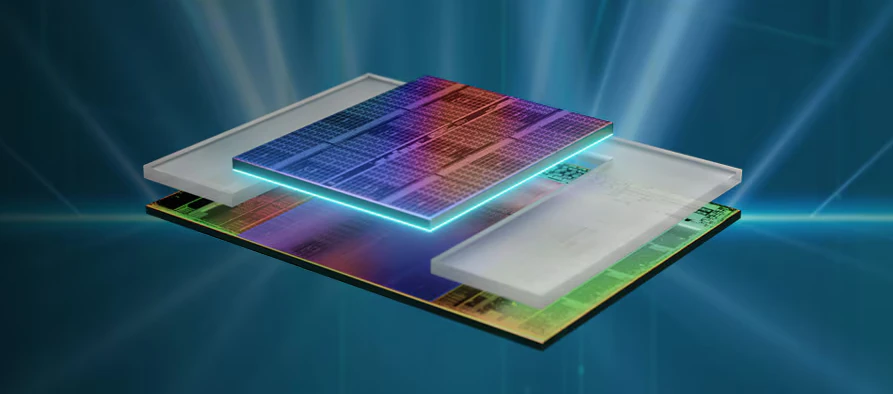
AMD's 3D V-Cache adds extra cache memory to selected processors by stacking a separate cache die with the processor's core die. It is an interesting way to improve performance without treating a larger clock-speed number as the only answer. For gaming and other workloads that repeatedly reuse data, having more of that data near the cores can reduce trips to slower system RAM.
I regard X3D processors as a compelling choice for power users, particularly gamers, but the benefit depends on the software and the rest of the computer. They deserve consideration alongside price, cooling and motherboard compatibility. More cache does not make every task faster or guarantee that a processor will handle all future software better.
What cache does
A cache is small, fast memory used to keep data and instructions that the processor may need again. Think of it as materials organised close to your desk, instead of repeatedly retrieving them from a larger store elsewhere. A cache hit finds the needed information there; a miss means looking farther along the memory hierarchy.
L1 is close to an individual core and very small. L2 provides more capacity, and L3 is larger again and shared according to the processor's design. Main RAM provides much more space but has different latency and bandwidth characteristics. There is no single set of nanosecond timings that accurately describes every processor, clock, memory configuration and access pattern.
Increasing capacity helps when a useful working set fits in the larger cache or when it reduces misses. It does not remove every miss, replace RAM, eliminate storage waits or solve a GPU bottleneck. Software that streams through data without reusing much of it may gain less than software that repeatedly accesses the same structures.
How AMD adds cache vertically
The familiar early desktop example is the Ryzen 7 5800X3D. It adds a 64MB cache die to a core complex die (CCD) with 32MB of L3, producing 96MB of L3 cache. This is different from fitting additional DDR memory into a motherboard: the cache is integrated into the processor package and is used automatically by the processor.
AMD describes through-silicon vias and direct copper-to-copper bonding as parts of the connection between the dies. The technology is a form of three-dimensional chip integration. It should not be pictured as a larger replaceable memory module or as an extra cache that an application must manually install.
Stacking introduces packaging and thermal design considerations as well as capacity. Exact die placement and operating limits depend on the generation. A single diagram of an early chip cannot be assumed to show the internal arrangement of every later X3D product.
Models and generations are different labels
| Example | Platform | Cache detail |
|---|---|---|
| Ryzen 7 5800X3D | AM4, DDR4 | 96MB L3; early desktop 3D V-Cache design |
| Ryzen 7 7800X3D | AM5, DDR5 | 96MB L3; one core chiplet |
| Ryzen 9 7950X3D | AM5, DDR5 | 128MB L3 across two core chiplets; extra stacked cache on one |
| Ryzen 7 9800X3D | AM5, DDR5 | Introduced AMD's second-generation 3D V-Cache layout |
| Ryzen 9 9950X3D2 Dual Edition | AM5 | Second-generation stacked cache on both core chiplets; AMD advertises 208MB total cache |
Do not confuse a Ryzen product series, its Zen architecture and AMD's named generation of cache technology. AMD calls the 9800X3D's design second-generation 3D V-Cache. Its 64MB stacked memory is below the core die, bringing the heat-producing cores closer to the cooling solution. The 2024 launch also describes it as the first fully unlocked X3D processor.
Older two-chiplet models such as the 7950X3D have an asymmetric layout. The other CCD is not “cache-free”: it still has its normal L3 cache, but lacks the additional stacked die. Their total cache should not be treated as one pool with identical access from every core.
The 9950X3D2, released in April 2026, shows why “only one CCD ever has V-Cache” is also outdated. AMD explicitly places stacked cache on both chiplets. Its advertised 208MB is total cache, so it must not be relabelled as 208MB of L3. Check which cache levels a headline combines before comparing products.
What it can mean for games
Games can benefit when their CPU work repeatedly accesses data that the extra cache keeps nearby. That can improve frame rates or consistency in a suitable workload. It does not guarantee the removal of micro-stutter, which can also involve shader compilation, storage, drivers or the game itself.
Assess average frame rate and frame-time behaviour together. A claimed percentage improvement needs a named game, settings, graphics card, memory setup and comparison processor. AMD's product performance claims have test-system footnotes; they are vendor results for those conditions, not measurements made here.
If the graphics card is already the limiting component at your chosen resolution and settings, a CPU upgrade may deliver less benefit than a CPU-focused benchmark suggests. Choose evidence that resembles what you actually play. There is no universal 25–50% improvement to 1% lows for every game or system.
Productivity and homelab workloads
Some simulations, engineering applications and other cache-sensitive workloads can benefit too. AMD applies 3D V-Cache to selected EPYC server processors, but those platforms and published workloads do not establish the same speedup for an ordinary desktop NAS or virtualisation host.
A database's entire useful index is not guaranteed to fit into 96MB, and several VMs share the host's resources. Compilation, rendering, transcoding and background services can have different bottlenecks. Compare application throughput, core count, memory capacity and I/O needs before paying specifically for cache.
On a workstation that combines gaming with professional work, look at both workloads. More cores or different clock behaviour can matter more for some tasks. An X3D model should be evaluated as a complete processor, rather than assuming its suffix makes it the best choice for everything.
Compatibility, software and cooling
Check the motherboard's exact CPU support list and required BIOS revision before an upgrade. An AM4 processor does not fit an AM5 board, and moving from DDR4 to DDR5 can change the platform cost. Include memory, cooling and any other necessary parts in the comparison.
Keep the relevant chipset software current. AMD's Windows chipset package includes a 3D V-Cache Performance Optimizer component for supported configurations. Scheduling and configuration matter on asymmetric multi-chiplet systems; do not assume a Windows setup instruction applies unchanged to Linux or a virtualisation host. Follow current guidance for the exact processor and operating system.
Cooling remains model specific. The newer arrangement improves the thermal path, but it does not promise a particular temperature, silence level or power draw with every air cooler. Read the processor's official cooling and operating specifications, use a compatible mount, and assess your case airflow and sustained workload.
TDP is a design rating, not a fixed gaming power measurement. For an efficiency comparison, use measurements with the same workload and system conditions. Include the rest of the system and the tasks you actually run if energy use is part of the decision.
Buying priorities
The technology remains a clever and compelling option for users whose workloads benefit from more cache. I would shortlist it for a gaming build, then compare the actual applications, total upgrade cost and compatibility. For casual work or a server primarily limited by RAM, storage or networking, the extra expense may provide little practical benefit.
Start with AMD's technology explanation and exact processor specifications. The broader processor comparison offers related context, while the final choice should match the work you want the machine to perform.