Few product prefixes in consumer networking carry as much history as D-Link's DIR ("D-Link Internet Router") series. Spanning more than two decades—from early 802.11g and Draft-N desktop boxes to modern multi-gigabit Wi-Fi 6 flagships—the DIR badge has served as the backbone for millions of home broadband installations, small office LANs, and homelab subnets worldwide.
While modular whole-home mesh systems like the D-Link Eagle Pro AI dominate marketing headlines today, traditional standalone routers equipped with high-gain external antennas remain the superior, lower-latency choice for single-story homes, open-plan apartments, and dedicated gaming workstations. In this guide, we examine the architecture, key generations, Wi-Fi 6 upgrades, and practical deployment scenarios across the D-Link DIR router family.
The Evolution of the D-Link DIR Series
To understand where the DIR series stands today, it helps to understand its technological trajectory. In the late 2000s, iconic units like the DIR-655 introduced gigabit Ethernet ports, intelligent QoS packet scheduling, and USB SharePort storage to mainstream home users. As the industry migrated from Wi-Fi 4 (802.11n) to Wi-Fi 5 (802.11ac), D-Link expanded the line into dual-band workhorses and flamboyant high-performance designs (including the distinctive red pyramidal DIR-890L AC3200 tri-band router).
With the arrival of Wi-Fi 6 (802.11ax), D-Link overhauled the lineup under the DIR-X moniker. These modern routers retain the traditional 4-port gigabit LAN desktop form factor while integrating modern orthogonal frequency-division multiple access (OFDMA), 1024-QAM modulation, and target wake time (TWT) power savings—bringing enterprise-grade airtime efficiency to home environments.
Classic AC Workhorses: DIR-842 and DIR-825
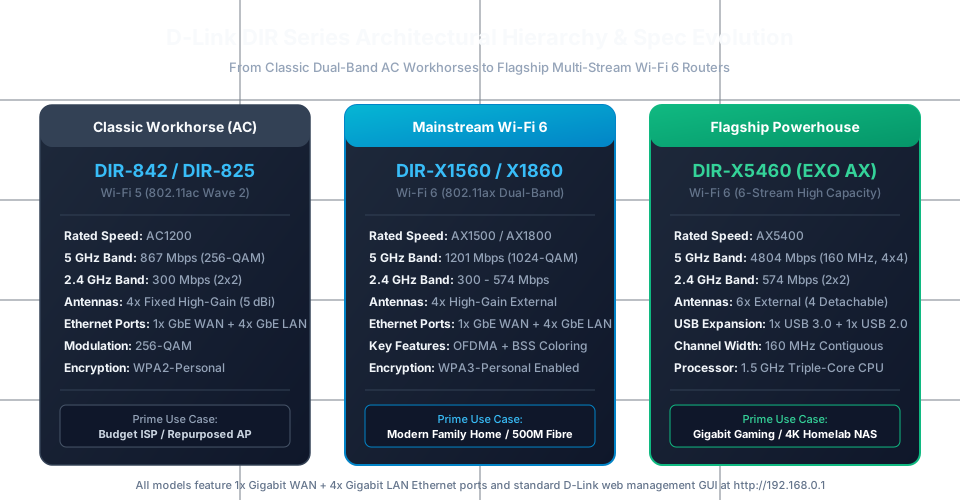
Before exploring Wi-Fi 6 models, it is worth acknowledging the workhorses that still power millions of households: the DIR-842 and DIR-825. These dual-band AC1200 routers became the default hardware supplied by hundreds of regional fibre and VDSL Internet service providers:
- Wireless Architecture: Delivers up to 867 Mbps on the 5 GHz band (802.11ac) and up to 300 Mbps on the 2.4 GHz band (802.11n).
- External Antenna Array: Features four fixed 5 dBi omnidirectional antennas arranged in an alternating 2.4 GHz / 5 GHz layout, maximizing horizontal RF propagation across standard drywall homes.
- Wired Connectivity: Unlike cheap entry-level routers crippled by Fast Ethernet (100 Mbps) ports, both the DIR-842 and DIR-825 provide a full Gigabit WAN port alongside 4 Gigabit LAN ports, ensuring that wired PCs and NAS appliances can saturate a 1 Gbps local link.
- ISP Firmware Customization: Many ISP-issued DIR-825 units incorporate custom TR-069 remote provisioning firmware, while retail revisions offer clean web GUIs for manual VLAN tagging and IPv6 dual-stack configuration.
Modern Wi-Fi 6 Lineup: The DIR-X Generation
For users upgrading their home broadband to 300 Mbps, 500 Mbps, or full gigabit fibre, the current DIR-X series delivers substantial performance leaps over older AC hardware. The lineup is organized into distinct performance tiers:
1. DIR-X1560 (AX1500)
The DIR-X1560 serves as D-Link’s entry point into Wi-Fi 6. It pairs a 1201 Mbps 5 GHz radio (operating with 1024-QAM modulation) with a 300 Mbps 2.4 GHz radio. Powered by a triple-core 1.5 GHz SoC, it eliminates the CPU bottleneck often experienced when older dual-core routers handle high-concurrency torrenting or multiple concurrent 4K streams.
2. DIR-X1860 (AX1800)
The DIR-X1860 upgrades the 2.4 GHz band to true Wi-Fi 6 (802.11ax), delivering up to 574 Mbps on 2.4 GHz alongside the 1201 Mbps 5 GHz stream. For homes with dozens of legacy IoT devices alongside modern smartphones, the balanced AX1800 configuration ensures improved spectral efficiency on both frequency bands simultaneously.
3. DIR-X5460 (AX5400 EXO AX)
Sitting at the high end of the family, the DIR-X5460 is engineered for bandwidth-heavy households and gamers. Key technical specifications include:
- 6-Stream Dual-Band Radio: Delivers up to 4804 Mbps on 5 GHz (4x4 spatial streams) and 574 Mbps on 2.4 GHz (2x2 streams).
- 160 MHz Contiguous Channel Support: Enables compatible Wi-Fi 6 client cards (such as Intel AX200/AX210 laptops) to negotiate full 2.4 Gbps physical link rates over the air.
- 6 External Antennas with Power Amplifiers: Employs four detachable high-gain antennas and two fixed antennas with discrete RF front-end modules (FEMs) for improved signal penetration through masonry.
- Dual USB Expansion: Includes one USB 3.0 port and one USB 2.0 port for local Samba file sharing and DLNA media streaming across your home network.
Hardware Specs & Comparison Breakdown
To help you select the ideal model for your specific floorplan and broadband tier, here is how the primary DIR generations compare side by side:
| Feature / Spec | DIR-842 (Classic AC) | DIR-X1560 (Entry AX) | DIR-X1860 (Mainstream AX) | DIR-X5460 (Flagship AX) |
|---|---|---|---|---|
| Wireless Generation | Wi-Fi 5 (802.11ac) | Wi-Fi 6 (802.11ax) | Wi-Fi 6 (802.11ax) | Wi-Fi 6 (802.11ax) |
| Speed Rating | AC1200 (867 + 300) | AX1500 (1201 + 300) | AX1800 (1201 + 574) | AX5400 (4804 + 574) |
| Channel Width | Up to 80 MHz | Up to 80 MHz | Up to 80 MHz | Up to 160 MHz contiguous |
| Spatial Streams | 2x2 (5GHz) + 2x2 (2.4GHz) | 2x2 (5GHz) + 2x2 (2.4GHz) | 2x2 (5GHz) + 2x2 (2.4GHz) | 4x4 (5GHz) + 2x2 (2.4GHz) |
| Modulation | 256-QAM | 1024-QAM | 1024-QAM | 1024-QAM |
| OFDMA / MU-MIMO | DL MU-MIMO only | OFDMA + MU-MIMO | OFDMA + MU-MIMO | OFDMA + 4x4 MU-MIMO |
| Antenna Count | 4x External Fixed | 4x External Fixed | 4x External Fixed | 6x External (4 Detachable) |
| Gigabit Ports | 1x WAN + 4x LAN | 1x WAN + 4x LAN | 1x WAN + 4x LAN | 1x WAN + 4x LAN |
| USB Ports | None | None | None | 1x USB 3.0 + 1x USB 2.0 |
| Security Standard | WPA2-Personal | WPA3-Personal | WPA3-Personal | WPA3-Personal |
Standalone High-Gain Router vs. Mesh Wi-Fi
With multi-node mesh packages like the D-Link M15 and TP-Link Deco widely available, when should you choose a standalone DIR router instead? Consider these critical architectural differences:
- Port Density: Compact mesh nodes usually offer only 1 or 2 Ethernet jacks per cube. If your entertainment center or homelab desk houses a desktop PC, gaming console, network-attached storage (NAS), and smart TV, a standalone DIR router provides 4 dedicated Gigabit LAN ports right out of the box without requiring an external desktop switch.
- Lower RF Latency for Gaming: Wireless mesh systems introduce hop-by-hop latency and airtime contention across wireless backhaul channels. A high-gain standalone router like the DIR-X5460 maintains a single direct RF link to client radios, eliminating backhaul queuing delays.
- Cost Efficiency in Compact Layouts: For apartments, townhouses, and single-level ranch homes under 1,800 square feet, a multi-node mesh system is often overkill. A centrally positioned DIR-X1860 or DIR-X5460 provides superior line-of-sight signal strength at half the price of a tri-band mesh kit.
- Detailed Web GUI Management: While consumer mesh systems increasingly restrict configuration to simplified mobile smartphone apps, the DIR series maintains comprehensive local web administration interfaces (accessible via standard browser at
http://192.168.0.1), giving power users direct control over routing tables, DNS intercept, and firewall rules.
Setup, Security Hardening & Repurposing
Hardening Your DIR Router
Whether deploying a brand-new DIR-X router or maintaining an older DIR-842, follow these foundational security hardening practices:
- Change Default Credentials: Immediately replace the default admin password upon initial setup. Never expose the web administration GUI to the public Internet; ensure the Remote Management toggle under Management > System Admin remains firmly disabled.
- Enable WPA3 Encryption: Under wireless security settings, transition from legacy WPA2-Personal to WPA3-Personal (or WPA2/WPA3 Transitional Mode) to protect your home network against offline dictionary attacks and KRACK exploits.
- Disable WPS (Wi-Fi Protected Setup): While convenient for pairing printers, legacy WPS PIN brute-forcing vulnerabilities make keeping WPS permanently disabled a best-practice security measure.
- Manage UPnP Deliberately: Universal Plug and Play automatically maps inbound ports for game consoles, but can be abused by rogue IoT malware. If you run a homelab, disable UPnP and configure explicit, audited port-forwarding rules instead.
Repurposing Older DIR Routers as Access Points
If you have an older DIR-842 or DIR-825 retired after upgrading to Wi-Fi 6, do not send it to e-waste. You can easily repurpose it into a high-speed wired access point or dedicated garage/garden switch:
- Connect a computer directly to one of the LAN ports of the old DIR router (leave the WAN port disconnected).
- Log in to the web interface at
http://192.168.0.1. - Navigate to Settings > Network and disable the internal DHCP server.
- Change the router’s LAN IP address to an unused IP address on your primary subnet (for example,
192.168.1.250if your main router is192.168.1.1). - Save settings and reboot the router. Connect an Ethernet cable from your main network switch into one of the LAN ports (not the WAN port) on the old DIR router.
Your old DIR router now acts as a transparent, high-performance gigabit switch and secondary Wi-Fi access point without introducing double-NAT complications.
Verdict: Which DIR Router Should You Choose?
The D-Link DIR series continues to prove that standalone desktop routers remain indispensable in modern home networking. For modest broadband connections or budget-conscious setups, the DIR-X1560 and DIR-X1860 deliver modern Wi-Fi 6 airtime efficiency, robust 4-port Gigabit switching, and WPA3 security at highly accessible price points.
For demanding households with gigabit fibre, multiple simultaneous 4K streams, and local NAS storage, the DIR-X5460 provides the 160 MHz channel bandwidth and 6-stream multi-gigabit throughput needed to saturate modern wireless cards. Explore our companion breakdowns of the D-Link Eagle Pro AI mesh ecosystem and our complete guide to Understanding Home Routers to determine the best layout for your network.