
A difficult technology problem rarely ends with a single answer. You might need to understand a broken configuration, check the documentation, change a file and confirm that the result works. GPT-6 Astra is OpenAI's attempt to make an AI assistant more useful across that whole process.
OpenAI recorded its API release on 3 September 2026, positioning Astra for demanding reasoning, coding, computer use, research and document creation. This introduction focuses on those launch capabilities and how a TechDecode reader might use them. The interesting question is what a task needs to reach a reliable result. OpenAI's release changelog establishes the launch timing.
What is GPT-6 Astra?
GPT-6 Astra is a hosted reasoning model. You give it instructions and relevant information; it produces an answer or, inside a suitably equipped application, requests actions through tools. OpenAI presents it as its most capable option for the most demanding work. Treat that as the publisher's positioning, rather than evidence that it wins every task.
For a beginner, the useful distinction is between a model and the application around it. ChatGPT Work and Codex provide interfaces, file handling and connections to tools. An API integration is software a developer builds to send requests and handle results. Choosing Astra supplies the reasoning component; the surrounding product determines what it can access and do.
OpenAI's launch-week product notes describe Astra in Codex and ChatGPT Work, with availability depending on account rollout and workspace controls. If you cannot see it, check your product's model selector and administrator settings before assuming a different model is Astra. The official product release notes describe that rollout.
How reasoning and tools work together
A reasoning model can spend additional computation working through a problem before delivering its answer. That can help with interdependent requirements: a change may fix one error while causing another, or an apparently good hardware choice may fail an important compatibility constraint. More reasoning still needs accurate input and a way to verify the output.
Tools provide observations or actions beyond generating text. A search tool can retrieve documentation. A file tool can inspect a configuration. A controlled execution environment can run a check. In an integration, the application executes permitted tool requests and returns their results to the model. Astra can then use that evidence when deciding the next step.
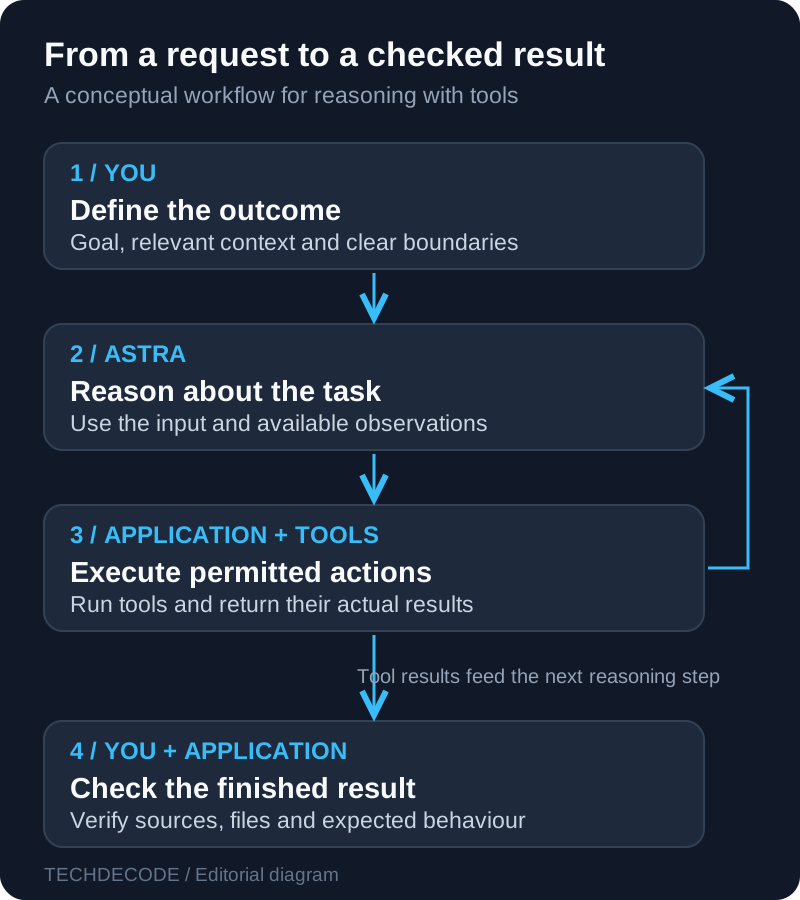
Imagine asking an assistant to investigate a Docker service that stops after a restart. With only your description, it can suggest possibilities. With a redacted Compose file and logs, it can connect those possibilities to evidence. With explicitly authorised tools, it may inspect files or run checks. Keep those three levels separate when deciding how much confidence to place in an answer.
For developers, Astra's tool calling uses the Responses API. Its launch also introduced controls for asynchronous tool work and steering an in-progress response. These are application capabilities to integrate, rather than buttons every chat interface must expose. The GPT-6 guide explains the supported workflow.
What can you give Astra?
The model reference lists text and image inputs, text output, a 1,050,000-token context window and a 128,000-token maximum output. It lists an April 2026 knowledge cutoff. Audio and video are not native input/output modalities on that model page; a surrounding application may use other services for them.
A token is a unit used to represent text or other input, rather than a fixed number of words. The context budget accommodates the request and its working conversation, not a guarantee of permanent memory. A large limit can make substantial documents easier to work with, but relevance still matters. Label the important files, describe their relationship and state which information takes priority.
For a networking question, a few focused inputs are often better than a folder full of unrelated exports: the exact router model and firmware, a simple network layout, the symptom and one representative log. For a screenshot, explain what you expected to see. Crop or redact credentials, QR codes and private identifiers before sharing it.
Practical uses for TechDecode readers
Homelab troubleshooting
Astra could help separate causes when a service works on your LAN but fails through a reverse proxy. Supply the public symptom, local result, relevant proxy configuration and redacted logs. Ask it to identify the evidence for each hypothesis and suggest the next least disruptive check. Do not let an invented IP address or assumed container path turn into a command you run.
A useful output is a short diagnostic sequence: what to check, what result would support the suspected cause and what to do if that result is absent. Compare this with your existing network troubleshooting fundamentals and the application's own documentation. The model should help organise the investigation while the observations determine the diagnosis.
Code and configuration review
Give it a bounded task such as reviewing a Compose change, explaining a Python error or checking a proposed automation. Include the expected behaviour and the version of the software involved. Ask for a minimal correction, the reason it is needed and a meaningful validation step. A beautifully formatted replacement file can still omit a volume or overwrite a setting you wanted to preserve.
For an existing project, start with a copy or version-controlled branch and inspect the diff. Check that names, dependencies and configuration options actually exist. If the assistant reports a successful check, look for the command, result and scope. A syntax check supports a different conclusion from running the service successfully.
Research and useful documents
Astra can also help turn a messy research question into a comparison or decision document. For example, ask for a home-server shortlist with requirements for storage expansion, Ethernet and a fixed budget. Give it a table structure that separates documented specifications, assumptions and unanswered questions.
When web search is available, require links to manufacturer documentation and check the exact model revision and region. Treat performance claims as claims until the conditions are clear. For a spreadsheet or report, verify units, formulas and source dates. A coherent explanation can be useful even when the honest conclusion is that the available evidence cannot yet support a purchase.
Getting access and choosing settings
In Codex or ChatGPT Work, choose Astra when it is available to your account. Start with a small representative task before committing a large repository or document collection. Product plans, usage limits and available tools can differ, so check the settings in the product you are actually using.
For API work, use the identifier gpt-6-astra. The documented reasoning levels are low, medium, high, xhigh and max. Astra does not support none. Start with a supported setting, measure whether extra effort improves your task and keep the lowest setting that reaches your required quality.
The launch guidance also says Astra does not support custom temperature, top_p or log probabilities. Copying an older request and changing only its model name can therefore fail. Check the official model guidance before adapting an integration, and use Responses when tools are involved.
What does using it cost?
API billing and a product subscription are different arrangements. API requests can incur input, output and applicable tool charges; product access follows that product's plan and usage rules. Use OpenAI's pricing reference for a fresh estimate instead of assuming that a subscription includes unlimited API calls.
Reasoning tokens consume output budget and are billed as output tokens, even though they are not the same as the visible answer. That makes a short final response an unreliable estimate of total work. The reasoning documentation explains this distinction.
Evaluate cost per useful result. Keep three or four representative tasks and record correctness, elapsed time, usage and the corrections you needed. Use equivalent input and tool access when comparing runs. A larger reasoning budget earns its place when it resolves difficult requirements more reliably, not simply when it produces a longer response.
Two prompts to start with
Clear instructions give a reasoning model something concrete to solve. Describe the outcome, the input, the boundaries and what success looks like. OpenAI's reasoning best practices favour direct prompts; asking for a hidden chain of thought is unnecessary. Ask for checkable conclusions, assumptions and evidence instead.
Example 1: review a configuration. Attach your redacted Compose file and relevant logs, then adapt this prompt:
Review the attached Docker Compose file and startup log.
The service should remain reachable on my LAN after a restart.
Identify problems supported by the supplied evidence.
Preserve existing volume paths, service names and port assignments.
Suggest the smallest correction and a non-destructive validation step.
Do not run commands or change files. List any missing information.
Example 2: create a useful comparison. Supply the exact product names and your requirements:
Compare the two router models listed below for my home.
I need wired backhaul, two Ethernet-connected PCs and stable video calls.
Use manufacturer documentation when web search is available.
Separate specifications, assumptions and advertised performance claims.
Link each important factual claim to its source.
Give a decision table and explain what information could change the choice.
If browsing is unavailable, say which claims still need checking.
These are starting points, not measured model results. Check whether the response respects the constraints, identifies missing information and gives you something you can verify. Our prompt engineering guide covers the broader habit of turning a vague question into a well-defined task.
Limits, privacy and control
GPT-6 Astra runs as a hosted service, so using it through an API or connected product is different from running an open model on your own server. Before sharing logs or documents, remove passwords, tokens and unnecessary personal data. Check the privacy controls for the product and connections involved.
OpenAI says API data is not used for training by default unless you opt in, but retention and application state depend on the feature and configuration. That policy does not mean every request stays only on your machine or that all stored information disappears immediately. The API data controls describe the relevant distinctions.
Computer use adds another boundary. An application must provide the environment and execute allowed actions. Start with limited access and review consequential changes. A website or document can contain misleading instructions; its text does not become your authorisation. OpenAI's computer-use guidance recommends isolation, bounded runs and checking the actual outcome.
For technology work, the final check should be specific: can the service start, does the proposed specification match the manufacturer's page, and does the document preserve the facts you supplied? Fluency and confidence are not substitutes for those checks. Keep uncertainty visible when an answer depends on missing logs, an unverified source or equipment nobody has tested.
Is Astra useful for you?
Astra is worth evaluating when your task has several connected stages and success depends on following constraints all the way through. Start with one awkward problem you understand well enough to assess: a configuration review, a research comparison or a document that needs checking against source material.
Provide relevant context, choose appropriate access and define the finished result. Then inspect what it produces. That approach gives the launch a practical meaning: a model becomes valuable when its reasoning and tools help you complete work with fewer gaps and clearer evidence.
Sources and further reading
- OpenAI API changelog: Astra's 3 September 2026 release and launch controls.
- GPT-6 Astra model reference: supported inputs, limits and settings.
- Using GPT-6: API integration and model guidance.
- ChatGPT and Codex release notes: launch-week product rollout.
- API pricing and reasoning tokens: understanding usage.
- Reasoning best practices, data controls and computer use: prompting and access boundaries.