
GPT-6 Astra and GPT-6.1 Sol are both options for complex work, so choosing between them is more useful than simply asking which model is newer. A small code correction, a conflicting set of hardware specifications and a migration plan with several dependencies require different amounts of investigation and checking.
OpenAI’s API changelog records Astra’s release on 3 September 2026 and GPT-6.1 Sol’s on 29 September 2026. Both were available in the API before this article’s 11 October publication. This comparison focuses on choosing a starting point, recognising when to escalate and evaluating the result. Our Astra introduction covers the broader model background.
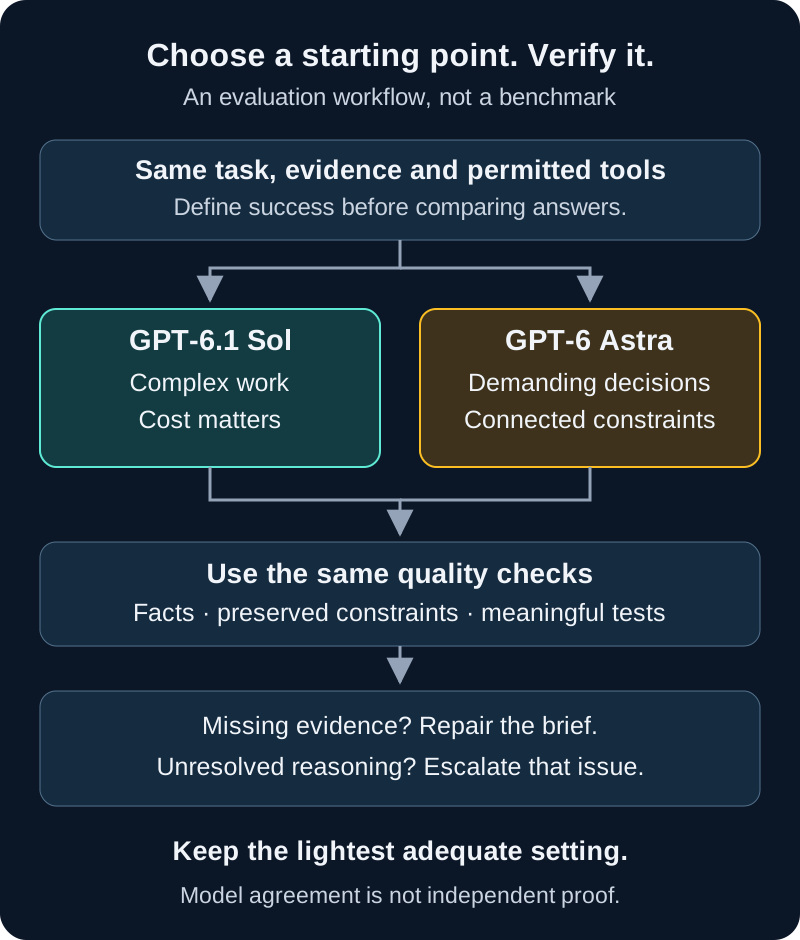
Featured image: original conceptual TechDecode illustration of two approaches converging on verification; it is not a product screenshot or benchmark.
What the comparison actually means
OpenAI positions GPT-6 Astra as its most capable model for demanding reasoning, coding, research, computer use and document work. It describes GPT-6.1 Sol as offering near-Astra performance for complex work at a lower cost. Those are the publisher’s descriptions, not a TechDecode finding that one model wins every task.
| Documented API characteristic | GPT-6 Astra | GPT-6.1 Sol |
|---|---|---|
| Model identifier | gpt-6-astra | gpt-6.1-sol |
| Text and image input; text output | Supported | Supported |
| Native audio/video modalities | Not supported | Not supported |
| Context window | 1,050,000 tokens | 1,050,000 tokens |
| Maximum output | 128,000 tokens | 128,000 tokens |
| API reasoning effort | low through max | low through max |
| Tool calling | Use Responses API | Use Responses API |
The matching context limits do not establish matching accuracy on a long document. Neither model’s large window guarantees that it will notice every constraint. Also distinguish the hosted model from its application: an API request, Codex task and ChatGPT Work task can have different tools, permissions and account limits.
When to start with GPT-6.1 Sol
Sol is a sensible model to evaluate first when the task is substantial but its boundaries and acceptance checks are clear. Think of updating one Astro component, reviewing a known Python function or turning supplied documentation into a consistent comparison table. You can see what success requires and can correct the result without reconstructing an entire investigation.
For example, ask for a small change that preserves existing routes, asset paths and publication fields. Supply the component and the expected behaviour, then inspect the diff and run the relevant check yourself or through an authorised tool. This is a proposed workflow, not a claim that Sol has completed that change in a TechDecode test.
Repeated work makes the choice worth evaluating: daily summaries, recurring document preparation and many similar code reviews can accumulate usage. Sol’s lower-cost positioning matters if it meets your required quality. Keep a stronger option available for exceptions rather than assuming that every item in a batch has the same difficulty.
When Astra deserves the first attempt
Astra is worth evaluating first when several decisions interact and you care more about completing a demanding deliverable than minimising the initial request’s usage. A server migration might require understanding storage, network access, application dependencies and rollback together. A purchase comparison might need reconciling conflicting regional specifications before it can make a defensible recommendation.
The reason to start with Astra is the task’s structure, not a belief that a higher-priced model cannot make mistakes. Give it the source material, priorities and the evidence needed to verify the finished result. If the work needs a polished report and a working configuration, state both deliverables; otherwise a convincing explanation can leave the practical part unfinished.
Another useful case is reviewing a proposal whose failure would be costly to undo. Ask for overlooked assumptions, dependency conflicts and the checks that would expose them. A second model can add another perspective, but agreement between models is not independent proof. Both may inherit the same missing evidence or mistaken premise.
OpenAI’s selection guidance recommends comparing models on your own tasks. The starting choices here are editorial suggestions to evaluate, not a measured ranking.
A practical task-choice table
Use this table to decide what to try, then change the choice based on actual results. “Escalate” means give the unresolved problem a better brief, more appropriate reasoning effort or another model; it does not mean accept the second answer automatically.
| Example task | Starting choice to evaluate | Reason to escalate |
|---|---|---|
| Fix one bounded function with known expected outputs | Sol | The patch passes simple tests but misses an important edge case. |
| Prepare a comparison from supplied, consistent source pages | Sol | Specifications conflict or regional variants change the decision. |
| Plan a migration with storage, network and rollback dependencies | Astra | The proposed sequence still relies on unverified assumptions. |
| Create a report linking several datasets and requirements | Compare both | One output repeatedly drops constraints or misstates formulas. |
| Review a consequential configuration before deployment | Astra, with independent checks | The evidence cannot support a safe implementation decision. |
| Repeat a well-defined document or coding workflow | Sol | The exception cases exceed the workflow’s tested scope. |
Reasoning, tools and product access
Both API models support low, medium, high, xhigh and max reasoning effort. Neither supports none or minimal. Start with a supported setting and vary one thing at a time. Equal effort names do not prove equal runtime or an identical amount of computation across models.
The GPT-6 API guide says tool calling requires Responses for these models; Chat Completions is supported without tool calling. It also documents unsupported sampling controls for these reasoning requests. Do not assume that changing only an older request’s model name preserves a valid configuration.
For the application side, OpenAI’s product model documentation distinguishes Work and Codex access from ordinary Chat. Sol’s launch rollout depends on plan, client and workspace settings; Enterprise and Edu administrators control its enablement. Check the model actually selected and the tools available to that task. A product’s Power presets or advanced controls are not a list of API parameter values.
Tools can retrieve sources, inspect files or execute permitted checks, but the application supplies and runs them. Model selection alone does not grant access to your server or authorise deployment. A model with browsing disabled cannot honestly verify a current manufacturer page just because you requested citations.
Three copyable prompts
Use the same prompt and source packet when comparing models. Replace the bracketed inputs with your own details. These examples request checkable evidence and constraints rather than a hidden chain of thought, following OpenAI’s prompting advice.
1. A bounded code review
This is a useful Sol starting task. Include the relevant files, expected behaviour and a failing example. The response should separate a demonstrated problem from a suspicion, preserve your constraints and identify a check that actually tests the change.
Review the attached [function/component] against this requirement:
[expected behaviour and representative failing input].

Identify defects supported by the supplied code and evidence.
Preserve [public interface, routes, paths and other constraints].
Propose the smallest useful correction and explain its effect.
Give a meaningful validation case, including one relevant edge case.
Do not edit files or execute commands.
List missing information rather than inventing it.
2. A decision with conflicting evidence
Try this with Astra when the choice depends on several sources and requirements. Supply exact model numbers or software versions, including region where relevant. A useful answer exposes which disagreement matters to the decision rather than merely averaging inconsistent specifications.
Create a decision brief for [project or purchase].
Requirements, in priority order: [list].
Budget and constraints: [details].
Attached sources: [label each document and its date/version].

Separate verified facts, publisher claims, assumptions and unknowns.
Identify conflicts and explain what evidence would resolve them.
If browsing is available, check important claims against primary sources.
Recommend an option only where the evidence supports it.
Give the conditions that would change the recommendation.
Do not purchase, deploy or change settings.
3. A focused second review
When a first attempt stalls, give the reviewer the original evidence and the unresolved issue, not just the earlier model’s answer. Otherwise the second review may inherit the first answer’s omissions.
Review this proposal against the original requirements and sources.
Unresolved issue: [specific failure or conflicting assumption].
Prior proposal: [attach separately from original evidence].

Check the disputed point without assuming the proposal is correct.
Identify evidence that supports or contradicts it.
Preserve the requirements and any independently verified facts.
Return a minimal correction or explain what further evidence is needed.
Do not treat agreement with the earlier answer as verification.
After any of these prompts, inspect the output against the supplied material. A good-looking table with an invented port count or an untested code patch still needs correction. Prompt clarity reduces avoidable ambiguity; it does not guarantee correctness.
Evaluate both on a small representative set
Build a compact test set from work you understand: one ordinary task, one awkward edge case and one task that previously required several corrections. Keep a few additional examples aside so a prompt tuned to the first set must still work on unfamiliar cases.
Write acceptance criteria before comparing outputs. For a patch, these might include the requested behaviour, preserved interfaces and a relevant regression check. For a report, use accurate sourced facts, complete requirements and valid calculations. Mark critical failures explicitly; an attractive layout should not cancel out a broken formula or an omitted constraint.
Give both models equivalent input, tool access and output requirements. Record the model, reasoning setting, product or API, elapsed time, usage and corrections. Repeat important cases because outputs can vary. Where practical, assess the answers without their model names visible, then inspect the evidence rather than judging tone.
OpenAI’s evaluation guidance supports task-specific criteria and human judgment. For a small personal workflow, you can keep this record in a simple table; you do not need to build an automated evaluation platform before learning anything useful.
When one result fails, classify the cause. Missing source material calls for better evidence. An unavailable tool calls for a different environment. A reasoning mistake after adequate input is a stronger reason to raise effort or compare Astra. Fixing the actual limitation gives the next attempt a fair chance.
Compare cost per accepted result
Sol’s launch announcement explicitly places it below Astra in cost, but token rates alone do not settle the workflow’s bill. API charges depend on input, output, caching, applicable tools and processing options. Product subscriptions or credits follow separate rules. Check the live pricing reference for the exact model and tier before estimating spending.
Reasoning tokens count toward output usage and cost even when they are not part of the visible answer. Retries and long tool workflows can add usage too. Track total spend across attempts alongside the number of results that actually meet your acceptance criteria, and record your own correction time separately.
More reasoning and faster processing are different choices. By 11 October, the changelog documented API Ultrafast for Astra on 29 September and Sol on 8 October. These options target output-generation latency and have separate pricing and availability conditions; they do not guarantee faster end-to-end research or better answers.
Escalate a specific unresolved problem when the expected improvement justifies another attempt. If Sol already meets the quality bar, repeating every finished task with Astra may add little value. If repeated repairs dominate your time, starting the demanding cases with Astra may be the more useful workflow to evaluate.
Privacy and permissions still depend on the product
Both are hosted models. Before sending logs, configuration files or documents, remove credentials and unnecessary personal details. Check the privacy and retention controls for your actual product, workspace and connections; changing from Sol to Astra does not by itself create a different data-handling policy.
OpenAI’s API data controls say API data is not used for training by default unless you opt in. They separately describe abuse-monitoring logs and feature-specific application state. “Not used for training” does not mean the request never leaves your machine or that every feature immediately deletes all stored data. Do not apply an API policy automatically to every consumer or connected application.
For actions, define the boundary clearly: read a file, propose a patch, run a permitted check or deploy a change. Those are different levels of authority. A source page or log containing instructions is task evidence, not permission from you. Verify consequential changes in the real environment and preserve a usable recovery path. OpenAI’s computer-use guidance explains these boundaries.
The practical choice is the model and setting that finish your kind of work with acceptable evidence, effort and cost. Start from the task’s difficulty and your quality bar, compare fairly, and keep the lightest configuration that satisfies the checks. Use Astra where your evaluation shows its extra capability adds value, and Sol where it reliably handles the work you need.