
Running an AI service at home can give your scripts, notes and applications a shared place to send inference requests. LocalAI provides that layer: you choose the models and hardware, while clients use a consistent API. Begin with one task you can evaluate, rather than a collection of models that fills your server.
This guide explains LocalAI and installs it in a Proxmox LXC using the requested Community Scripts LocalAI workflow. It follows the production helper revision reviewed on 13 October 2026, including its CPU-backend selection fix. LocalAI v4.11.0 was released on 2 October; later runs of the helper may select another release.
Featured image: original conceptual TechDecode illustration of a local AI homelab.
What LocalAI is, and where the model fits
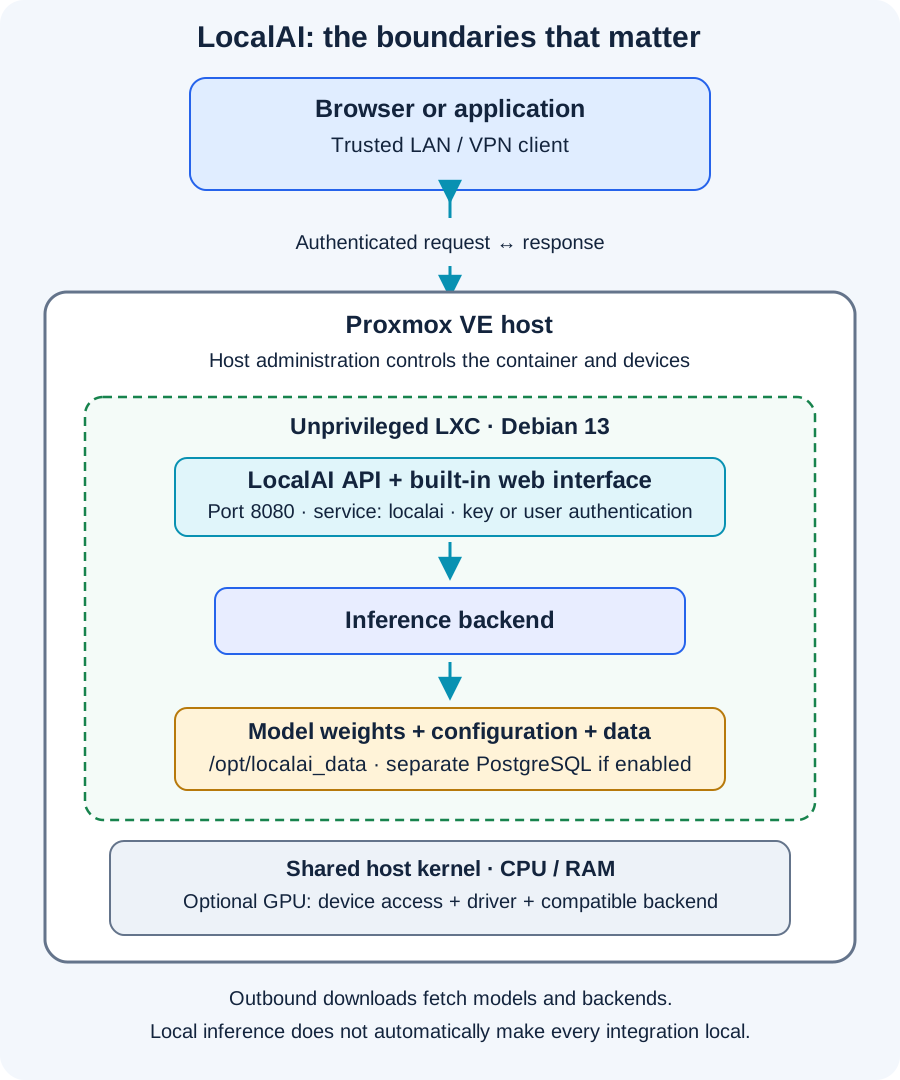
LocalAI is an open-source, MIT-licensed inference service. Its core handles HTTP requests, model routing and a built-in web interface, while separate inference backends do the computation. A compatible GGUF text model can use the llama.cpp backend. Installing the server does not install every backend or a universal model. The project overview explains this architecture.
Keep four parts separate. A model contains trained weights and has its own license, capabilities and limits. A backend runs those weights. The API lets software request a result. A front end presents chat or another workflow to a person. LocalAI includes a front end, but another application can also call its API.
OpenAI-compatible means an application can often reuse familiar request formats and change its base URL. It does not give a local model the quality, context limit or every feature of a hosted model. Confirm the endpoint, model and client options together.
Choose one useful workload
Text generation can help draft a summary or explain a redacted configuration. Embeddings convert text into vectors for search; a document-search application still needs retrieval, source handling and answer checking. LocalAI also supports image understanding and generation, speech recognition and speech synthesis through suitable models and backends. These are separate workloads with different hardware needs, as the feature documentation shows.
Begin with a non-sensitive text prompt whose answer you can assess, then try a representative note summary or log explanation. Record incorrect details and missing information. A successful request proves connectivity and inference; it does not establish that the output is accurate enough to automate a consequential decision.
Hardware: size the model, context and workload
The helper's defaults are installation settings, not a promise that an arbitrary model will fit. Leave capacity for Proxmox and other guests. An SSD helps model loading; free disk space must cover models, backend artifacts and temporary transfers.
Parameter count and quantization describe only part of memory demand. As a rough arithmetic example, eight billion weights at four bits each represent about four billion bytes before format overhead. That is not a four-gigabyte RAM recommendation. The backend also needs working buffers, and a text model's key/value cache grows with context. Concurrent requests or several loaded models increase demand.
A model's advertised context is a supported upper limit, not free memory. Start with a modest context, include room for the response and evaluate the actual task. Smaller quantized models reduce storage and memory, with quality tradeoffs to assess. LocalAI's configuration reference explains context, threads, layer offload and memory settings.
CPU inference is a practical baseline for supported models, though response time depends on the processor and workload. A GPU can accelerate compatible backends, but VRAM and system RAM are not interchangeable. Check the exact card, driver and backend before buying hardware. Neither a GPU switch nor a visible device name establishes that inference uses it.
Review the community installer before running it
The requested page identifies ct/localai.sh in community-scripts/ProxmoxVE. That wrapper loads the shared Community Scripts core, creates the LXC and runs install/localai-install.sh inside it. Review the wrapper, the installer and their shared core. This is community software with host-level permissions.
Use the Proxmox node's Shell as root for creation, on a maintained host with enough resources, working DNS and outbound HTTPS. Choose storage and networking deliberately. These examples pin the reviewed wrapper and core revisions and separate download/inspection from execution. The checksum confirms the wrapper matches this review; it does not establish the installer's safety.
scripts_rev=6234161462c0b0cfdb5e14204c56bd85d6af53f7
core_rev=3d66bb94d122bfe640f31e3312b2867d3e245125
scripts_base="https://raw.githubusercontent.com/community-scripts/ProxmoxVE/$scripts_rev"
core_base="https://raw.githubusercontent.com/community-scripts/core/$core_rev"

curl -fsSL "$scripts_base/ct/localai.sh" -o localai-helper.sh
printf '%s  %s\n' \
  '377aa85fe9871f61f8ede49ac8c3eb323f43cd7ba86f4a7975cbd4d2a4d3affd' \
  'localai-helper.sh' | sha256sum --check
less localai-helper.sh
Stop if the download or checksum check fails. Keep these variables in the same shell and review the referenced dependency paths before continuing. Operating-system packages, the release binary and later model/backend artifacts still come from external sources; pinning helper code does not freeze every download. Record the deployed versions for recovery.
Create the container and understand its defaults
For a first CPU deployment, this invocation explicitly disables GPU passthrough. It uses the same community wrapper with reviewed source locations:
COMMUNITY_SCRIPTS_URL="$scripts_base" \
COMMUNITY_SCRIPTS_CORE_URL="$core_base" \
var_gpu=no \
bash ./localai-helper.sh
Select Default Install for the declared settings, or Advanced Install to review resources, container type, bridge, addressing and GPU options. Saved user or application defaults can change the result, so inspect the final settings.
| Reviewed default | Value | Practical meaning |
|---|---|---|
| CPU / RAM / disk | 4 cores / 8192 MiB / 30 GB disk setting | Budget for the model and other guests. |
| OS / container | Debian 13 / unprivileged LXC | The guest shares the host kernel. |
| Port / account mode | 8080 / user accounts off | A generated static API key protects the default API. |
| GPU declaration | Enabled in the wrapper | The invocation above overrides this to no. |
The installer adds numerical libraries, downloads a matching Linux release binary and creates localai.service. Its executable is /opt/localai/localai, settings are in /opt/localai.env, and models/backends are under /opt/localai_data. The environment file is restricted to mode 600. The service runs as root inside the container; unprivileged LXC does not remove the need to trust its software and protect the host.
GPU setup is a separate compatibility check
For an intentional GPU deployment, review Advanced Install and enable passthrough instead of using the CPU override. Shared host code detects device types; mixed types can prompt for selection, with a timeout defaulting to all. Container hardware setup requires enabled passthrough and device nodes. NVIDIA setup may ask about driver libraries and depends on the host driver; Intel and AMD have separate dependency paths.
The 13 October fix forces LOCALAI_FORCE_META_BACKEND_CAPABILITY=default when it finds no CUDA, ROCm or Intel runtime library. This prevents choosing a GPU backend merely because the host's card is visible in system information. Follow LocalAI's GPU guidance and verify device access, compatible drivers and actual backend offload before expecting acceleration.
First start: verify the service, then install a model
After creation, open the container's Console. These commands belong there, not in the Proxmox host shell:
systemctl status localai --no-pager
journalctl -u localai -n 50 --no-pager
curl -q -fsS http://127.0.0.1:8080/readyz
An active service and a successful readiness response establish the API process, not a working model. The helper installs no models by default. It binds to all container interfaces at port 8080, so restrict incoming access before opening it from another device.
With default account mode, the generated key is saved in /root/localai.creds. Retrieve it privately and use the web interface's API-key sign-in at http:// followed by the container IP and :8080, on a trusted network. This key has admin access. The page offers an Enable User Accounts option; the reviewed script also accepts var_auth=yes before execution. In that mode, the helper installs PostgreSQL and uses approval-mode registration; register the intended first administrator while access is restricted. The first registration is privileged even in approval mode.
Open Models → Explore, select a small supported text model and inspect its size, backend and license. The official quickstart uses qwen3-4b as an example; it is a candidate, not a guaranteed fit or speed result. Wait for model and backend downloads, then select it in Chat. Use the exact installed identifier for API requests.
Make a first authenticated inference request
These Bash examples run in the container and require curl and jq. They use loopback, avoid putting the real key into a saved command, and pass authorization through curl's standard-input configuration. Paste the helper-generated key when prompted:
command -v curl jq
read -r -s -p 'Paste the generated LocalAI API key: ' LOCALAI_KEY
printf '\n'
curl -q -fsS --config - <<EOF
url = "http://127.0.0.1:8080/v1/models"
header = "Authorization: Bearer $LOCALAI_KEY"
EOF
Copy an installed text model's exact id from the list, then supply it to this short request. jq handles JSON quoting:
read -r -p 'Exact installed model id from /v1/models: ' LOCALAI_MODEL
request="$(jq -n --arg model "$LOCALAI_MODEL" '{
  model: $model,
  messages: [{
    role: "user",
    content: "Explain in two sentences what a homelab is."
  }],
  max_tokens: 64,
  stream: false
}')"

curl -q -fsS --config - \
  -H 'Content-Type: application/json' \
  --data "$request" <<EOF
url = "http://127.0.0.1:8080/v1/chat/completions"
header = "Authorization: Bearer $LOCALAI_KEY"
EOF
unset LOCALAI_KEY LOCALAI_MODEL request
Look for a chat-completion response with generated content, or read the error and service log. The 64-token output limit keeps this example small; some reasoning models need more budget for a visible answer. First-use loading can take longer than later requests. For another client, configure the container address and base path it expects, commonly ending in /v1. A hosted-model name will not automatically select your installed model.
Privacy depends on the whole deployment
Local inference lets prompts and computation stay on your hardware when the backend and integrations are local. Downloads contact external publishers. Remote providers, web tools, logging and front ends can introduce more data flows. Review the helper's diagnostics preference and connected applications; self-hosting does not make every request local.
Keep the API on a trusted LAN or VPN, restrict clients and use HTTPS for network access carrying credentials or private prompts. A reverse proxy needs TLS and an effective access policy. Avoid direct internet port forwarding and sharing the default admin key with an untrusted application. The authentication documentation distinguishes static admin keys from user roles and per-user keys.
Models and backends are inputs from publishers you must trust. Check licenses and sources; a model name does not establish safety or accuracy. Give agents only the files and tools their task requires. Explaining a redacted log does not require Proxmox administrator credentials.
Troubleshoot the right layer
- Connection refused: check service status, container IP and port. Loopback success with remote failure points toward routing or access rules.
- Unauthorized request: check the actual key or user credentials. Keep authentication enabled.
- Missing model or backend: check installation completion, exact identifier, paths and backend logs. An empty model list after installing the server is expected.
- Memory failure or a killed backend: reduce model size, context or concurrency and inspect RAM/VRAM pressure.
- GPU failure or illegal instruction: check devices and driver/runtime compatibility, or whether the backend uses CPU instructions the host lacks.
LocalAI's runtime reference connects symptoms to evidence. Use debug logging temporarily and redact secrets or private prompts before sharing logs. Measure cold-start delay separately from ongoing generation.
Updates, backups and recovery
Before updating, save the deployed version, helper/core revisions, model configurations and a known-working request. Back up /opt/localai.env, the service unit, private credential records and needed contents of /opt/localai_data. Treat these as sensitive. With PostgreSQL account mode, include a consistent database backup and restore procedure; the model directory alone does not preserve that database.
The helper creates an update command inside the container. Review its recorded URLs, back up, then run it from the container console. It checks releases, stops LocalAI, replaces the binary and restarts. The pinned installation retains reviewed helper/core URLs, while application-release lookup still follows upstream. Review a newer helper revision deliberately when adopting fixes. Maintain Debian security updates separately.
Check readiness, authentication and the same small inference request after changes. Test recovery in a separate container with external access blocked: restore configuration and data, restore PostgreSQL if used, and verify the user and model before switching clients. Ensure Proxmox backups include relevant storage; separately mounted data needs explicit backup planning. A snapshot helps rollback but is not an independent backup.
LocalAI is useful when a maintained, shared endpoint simplifies a real homelab task. Start with one model, keep permissions narrow, and expand after checking output quality, resources and recovery.
Sources and further reading
- Requested community helper page; reviewed wrapper, installer and shared core are linked above.
- LocalAI v4.11.0 release and FAQ.
- Model installation, configuration, authentication and troubleshooting.