Although one of the main reasons for our Build your own homelab series is to save money, not all services will be cheaper hosting them ourselves as opposed to getting a paid subscription. Reactive Resume offers a free hosted account as well as self-hostable software. The project describes itself as free and open source, although infrastructure and optional provider usage can have their own costs. So why would one then want to self-host it? Is it even worth the effort? Let's first look at what Reactive Resume is and how it works.
What is Reactive Resume?
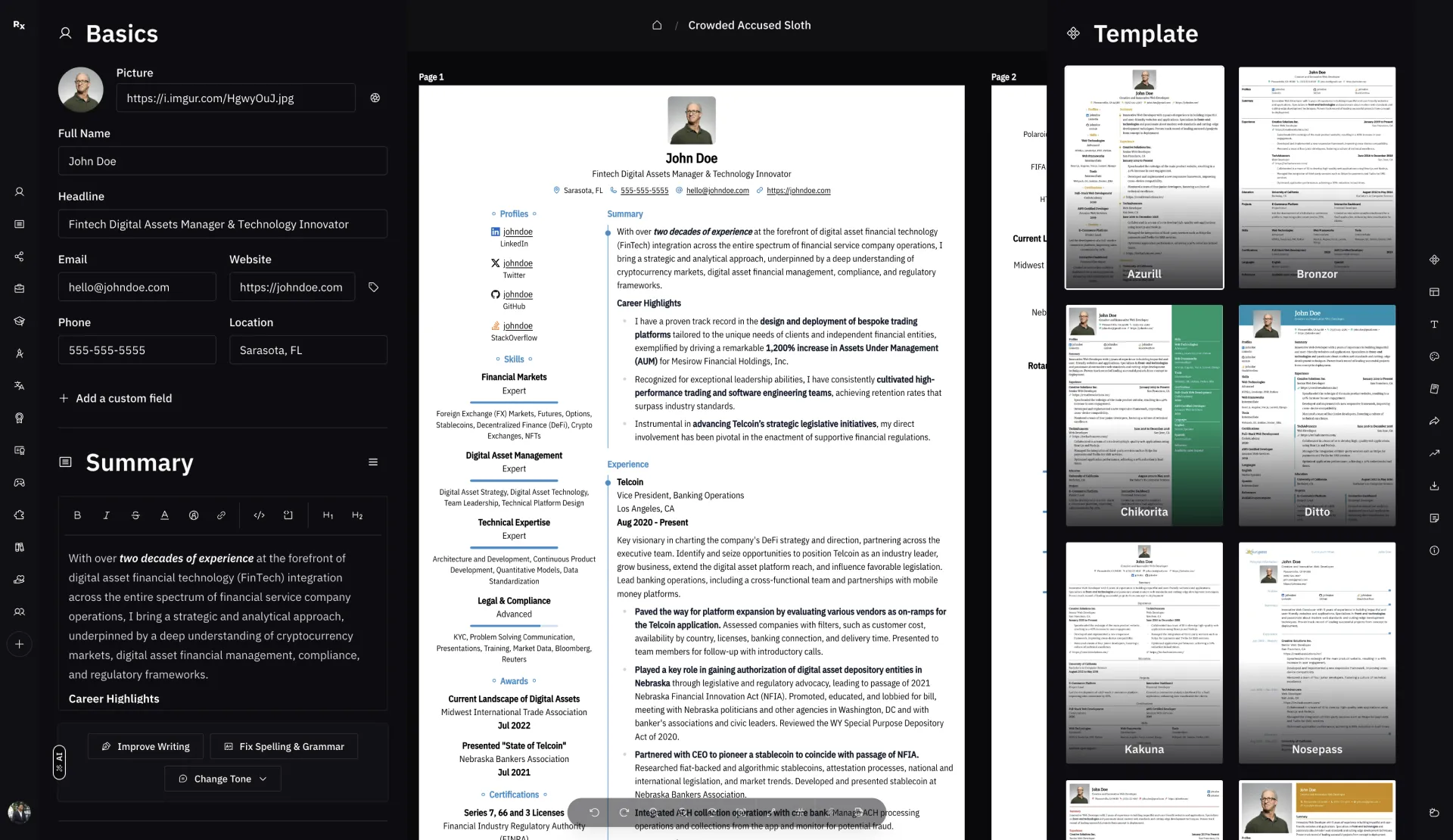
Reactive Resume is an open-source web resume builder with a visual editor, live preview, templates and public-link sharing. The project states that it has no ads or tracking and publishes its code under the MIT license. Its current v6 release also includes cover letters, application tracking and document checks, with optional AI through a provider you connect.
These features help organize and present your experience, but no builder guarantees that a resume passes every hiring system or gets shortlisted. Keep a factual master resume and tailor copies for particular roles rather than treating template choice as a substitute for relevant content.
How Reactive Resume Works
Version matters when planning the server. The older v4 Compose example used the application, PostgreSQL, MinIO and a Browserless Chromium service for printing/previews. That describes a legacy architecture, not the requirements of a current latest image.
The current v6 codebase uses React/Vite for the web app, Hono for its server, PostgreSQL with Drizzle and Better Auth. Its published-image Docker guide uses the app plus PostgreSQL, with persistent upload storage. PDF generation uses Forme rather than a separate Browserless or Chromium printer. Match configuration and migration instructions to the release you actually run.
A helper can make self-hosting approachable on our Proxmox homelab, and the free hosted service remains an attractive option when you mainly want to write a resume. Ease of launching a service still leaves version compatibility, backups and access control to check.
Why Self‑Host Reactive Resume?
Self-hosting lets you choose where the database and uploads are stored and who administers them. It does not eliminate data breaches or guarantee that nothing reaches a third party: optional AI, email delivery, linked identity providers and externally hosted images can introduce other services. Inspect the complete configuration before claiming a fully local data path.
There may be little direct subscription saving compared with the project's free hosted account. The main reasons to self-host are control, customization and learning. Include electricity, hardware or VPS storage, maintenance and recovery work in the comparison. A local installation may keep editing accessible on a working LAN, but cloud-connected features can still need internet access.
Overview Of Self-hosting Reactive Resume
Legacy Docker documentation: https://docs.rxresu.me/product-guides/self-hosting-reactive-resume-using-docker. For a current deployment, use the publisher's version-matched Docker guide and release notes. The old address may no longer resolve.
If you have a Proxmox instance, like we do, the amazing community scripts offer a convenient launcher. Inspect it and its installation dependencies before granting it host-level access. A moving script that fetches a moving latest release is not a tested compatibility guarantee.
The community installer currently labels its configuration v5 and creates a Chromium printer service, while the current stable publisher release is v6.0.2. Confirm that the selected helper revision supports the intended release before relying on it for a fresh installation or upgrade. The publisher's current Docker method provides a clearer version-matched starting point while those assumptions differ.
The helper currently defaults to two vCPUs, 4096 MB RAM and 8 GB storage. Those are its defaults, not a universal application requirement or a measured capacity. The current publisher guide specifies at least one vCPU/one GB for the app, allowing two GB when PostgreSQL shares the host, plus storage for documents and uploads. Choose resources for the release and workload, leaving room for backups and updates.
Pros and Cons of Self‑Hosting Reactive Resume
Pros
- Full data ownership & privacy: The project states no tracking or ads; your deployment controls local storage and access. Optional integrations still need their own data-path assessment.
- Deep customisation: Modify templates, layouts, and even core code to fit your branding or workflow.
- Skill development: Gain hands‑on experience with Docker, Linux administration, and security best practices.
Cons
- Ongoing maintenance: You’re responsible for applying security patches, managing backups, and monitoring uptime.
- Technical complexity: Initial setup involves Docker Compose,
.envmanagement, and secret generation, which can be challenging for non‑technical users. A helper can simplify setup, but still requires Proxmox and a compatible application release. - Infrastructure costs: VPS hosting, SSL certificates, and ancillary services (e.g., SMTP) may incur fees that offset savings.
- No managed support: Troubleshooting, scaling, and updating depend entirely on your team’s capacity and expertise.
Self‑Hosting vs Hosted at rxresu.me
The hosted service is convenient when you want an account without administering a server. Self-hosting places updates, configuration, backups and certificates under your responsibility. The project offers the same core application, but deployment-specific sign-in and optional services depend on what is configured. Review the hosted privacy policy or your own deployment's data handling rather than equating self-hosting with perfect privacy.
Conclusion
Reactive Resume offers a modern, privacy‑first platform for building, sharing, and managing resumes, available both as a zero‑setup hosted service at rxresu.me and as a self-hostable application for control over its deployment. While the hosted service provides instant access, automated maintenance, and free usage, self-hosting offers storage control, customization flexibility and DevOps skill growth at the cost of infrastructure management and security upkeep. Whether you prefer the convenience of a hosted solution or the autonomy of self‑hosting, Reactive Resume delivers a comprehensive, user‑friendly resume builder for everyone.
Separate Legacy v4 and Current v6 Deployment Plans
| Area | Legacy v4 example | Current v6 published-image guide |
|---|---|---|
| Required deployment pieces | App, PostgreSQL, MinIO and Browserless Chromium | App, PostgreSQL and persistent uploads |
| PDF rendering | External Chromium service | Forme in the app/browser; no separate printer |
| Upload persistence | Configured object-store volume/bucket | Mounted /app/data or configured S3-compatible storage |
| Configuration | Legacy public/storage/Chrome and token variables | APP_URL, database connection and persistent authentication secrets, plus optional services |
Current v6 uses an application port 3000 and optional services rather than requiring Redis or SMTP for every small installation. The source-development Compose file is also different from the published-image deployment guide: it builds a checkout and includes additional services. Do not combine their service names, storage paths and defaults casually.
Set the public URL to the actual address users enter, including the correct scheme and port. Containers on a shared network reach the database by its service name; the app container's localhost is not another database container. Keep database access private and uploads writable by the application user. A successful login does not prove PDF export, storage, email or AI is functioning.
Back up PostgreSQL, uploads and the configuration secrets together. Preserve the applicable authentication and encryption secrets so restored two-factor settings and stored provider keys remain usable. A JSON resume export is valuable for document portability, but is not a complete account/database backup. Test restoration in an isolated instance before upgrading live data.
Major-version migration is a separate operation from pulling an image. Read the release's migration guide, retain the old data/configuration and verify representative resumes, sharing and exports after the move. Never infer safe v4-to-v6 migration from a latest tag or a one-click launcher.
Use Optional AI to Improve Wording, Not Invent Experience
Current Reactive Resume supports several AI providers, including OpenAI and Ollama, with version-specific configuration and endpoint requirements. A custom base URL is not proof that any OpenWebUI or local model endpoint supports the expected operations. Check the selected provider, reachable address and required model capabilities before connecting it.
AI can help make an existing bullet clearer, fix grammar or propose a different tone. Review every suggestion against your actual experience. Do not accept a generated percentage, certification or job responsibility merely because it sounds impressive. If an impact was not measured, describe the real work and outcome without manufacturing a number.
Optional cloud AI sends the selected text to the configured provider. OpenAI API usage is billed separately from ChatGPT subscriptions; a free resume-builder account does not provide free API usage. A local model avoids that particular cloud call when correctly configured, but hardware, access controls and other workflow integrations still matter.
Maintain a factual master document and separate role-specific copies. Use relevant job-posting terms only where true. The current Check workflow distinguishes mechanical readability/job-match checks from an optional model's writing opinion, and its score does not predict a shortlist or job offer.
Verify the Document a Recruiter Receives
Inspect the actual exported PDF rather than ranking every visual editor or source-based tool as universally good or bad for applicant tracking systems. Check text selection and extraction order, dates, contact information, headings, links and page breaks. A two-column layout may look attractive while a particular parser reads its sidebar at an unexpected point.
Reactive Resume's current Check mode and exported-PDF check can help identify these issues. Review the parser view and fix real problems instead of chasing a score by adding untrue keywords. Where an employer specifies a format or uses a portal that parses an upload, follow that requirement and inspect the imported fields.
Before sharing publicly, confirm which personal details should be visible and whether a link password is appropriate. Unlisted and no-index requests do not make a public link secret to everyone who has it. Test the link from a signed-out session and verify the document version you actually intend to submit. These practical checks make a convenient resume builder useful without promising an automatic hiring advantage.