For a self-hosting enthusiast, the homelab offers endless experimentation and learning, from spinning up new services to fine-tuning network performance. Security is part of that work. Many of us prefer open-source tools, but Zenarmor offers an appealing alternative when visibility and convenient management matter. Here we look at its Free Edition and subscriptions, the tradeoffs against familiar firewall packages, and what to check before paying for it.
Demystifying Zenarmor: More Than Just a Paid Solution
Zenarmor is not paid-only software. Its Free Edition provides a way to evaluate the platform before choosing a subscription. That matters for budget-conscious homelabbers: paying makes sense when the additional controls solve a problem you actually have, rather than simply because a higher edition exists.
The subscription guide says Free and Home are intended for non-commercial use. A home lab is different from using the product for a business. The live pricing comparison, checked in October 2026, lists Home at US$9.99 per month and five policies, including the default policy, versus one for Free. Check the current billing terms, user/site limits and exact features before buying; older comparison guides may describe different allowances.
Zenarmor markets itself as a "Next-Generation Firewall" (NGFW). Its supported deployment options include OPNsense, pfSense CE and Linux systems. Think of it as an additional inspection and policy layer, rather than a reason to stop maintaining the underlying firewall rules, operating system or endpoints.
So, what makes Zenarmor an attractive prospect for a homelab?
For some, the answer lies in its ease of use and streamlined management. While setting up and configuring open-source security tools can be a rewarding technical challenge, it can also be time-consuming and complex. Zenarmor offers a polished graphical user interface (GUI) that simplifies tasks like:
- Application Control: Identify and control application traffic, subject to the capabilities of your edition and deployment.
- Web Filtering: Implement content filtering policies with pre-defined categories.
- Threat Intelligence: Use reputation information to help classify and block risky destinations. Identification and reputation checks are useful signals, not a guarantee that every malicious connection will be caught.
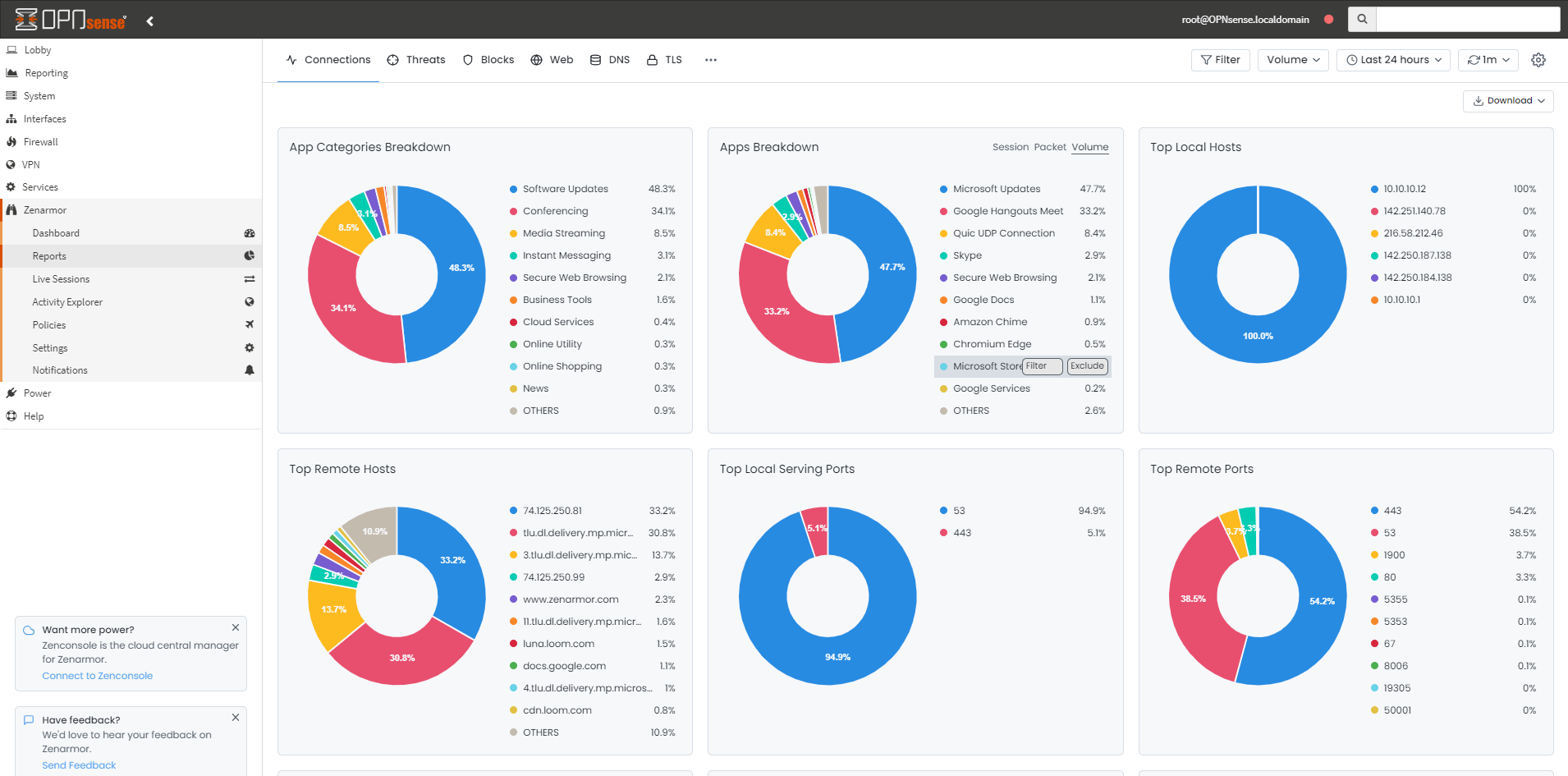
- Rich Reporting and Analytics: Gain deep insights into your network traffic with visually appealing and easy-to-understand reports.
For a homelab user who values their time, a polished interface and convenient policy management can be a significant draw. I find that a compelling reason to consider a subscription. It still requires updates, exception handling and occasional checks that policies match the intended devices. The important comparison is the time you spend maintaining a useful configuration, not a promise of completely unattended security.
The Free and Open-Source Champions: Your Homelab Security Workhorses
Before opening your wallet, consider the free and open-source tools already available for your firewall. They are capable options, particularly if learning and tuning the configuration are part of what you enjoy about a homelab. Their roles overlap with some Zenarmor features, but this is not a comparison of identical products or a measured security benchmark.
OPNsense and pfSense: The Firewall Foundations
OPNsense and pfSense Community Edition are FreeBSD-based open-source firewall platforms. They provide the underlying routing, stateful firewall and VPN capabilities on which you can build. pfSense Plus is Netgate's separate commercial, closed-source product; it should not be described as the same open-source edition as CE. Whichever platform you choose, start with correct firewall rules and a supported update path.
Suricata and Snort: The Intrusion Detection and Prevention Powerhouses
OPNsense's built-in IDS/IPS uses Suricata. On pfSense, Snort and Suricata are available as add-on packages. These tools inspect traffic using configured rules: IDS alerts, while IPS can block matching traffic. Installing a package is not the same as enabling and tuning a useful ruleset.
Open-source software does not mean every feed is free. Netgate's Snort guide distinguishes community rules, registered-user rules and paid subscriptions. Rule selection, updates and false-positive handling remain part of the work. Application detection also exists in tools such as Snort's OpenAppID, so it is too simplistic to say free tools cannot identify applications at all.
pfBlockerNG (for pfSense): The All-in-One Blocker
For pfSense users, pfBlockerNG is a useful tool to consider. It manages IP blocklists and DNS-based blocking, including lists targeting ads, trackers and malicious destinations. Netgate's website-blocking guidance explains that DNS controls depend on which resolver clients use and can be bypassed. IP/DNS blocking is different from decrypting and inspecting an HTTPS payload. Check false positives and needed services before adding increasingly broad lists.
Head-to-Head: Zenarmor vs. Free Self-Hosted Security
Is a Zenarmor subscription worth it when free tools are available? My answer depends on your priorities, technical expertise and what you want from your homelab. The table below reflects that convenience-versus-customization assessment, rather than test results proving one stack offers better protection.
| Feature | Zenarmor (Paid Tiers) | Free Alternatives (OPNsense/pfSense + Packages) |
|---|---|---|
| Ease of Use & UI | Highly polished, user-friendly GUI. Centralized management. | Functional but can be more complex. Requires navigating different package interfaces. |
| Setup & Configuration | Generally straightforward and well-documented. | Can be more involved, requiring research and community support. |
| Advanced Threat Intel | Commercially curated and automatically updated threat intelligence feeds. | Community/open feeds are available; some rules and reputation feeds require paid subscriptions. |
| Reporting & Analytics | Rich, visually appealing, and easy-to-digest reports. | Functional but often less visually intuitive. May require more manual analysis. |
| Application Control | Granular and user-friendly application identification and control. | Possible through a combination of tools, but can be more complex to configure. |
| Cost | Monthly or annual subscription fee. | Software may be free; hardware, optional feeds, support and your maintenance time still have costs. |
| Learning Curve | A convenient starting point, in my view; interface selection and policy tuning still need care. | Steeper, but offers a deeper understanding of network security principles. |
The Verdict: Is Zenarmor the Right Choice for Your Homelab?
Here’s a breakdown to help you decide:
You might find Zenarmor's paid service worth it if:
- You value your time and convenience: The streamlined interface and automated features can save you significant configuration and maintenance time.
- You want convenient access to more advanced controls: Zenarmor brings useful security and reporting tools into a consistent interface, provided your subscription includes the features you need.
- You desire rich, out-of-the-box reporting: If detailed and easy-to-read analytics are a priority, Zenarmor excels here.
- You're a "tinkerer" who wants to focus on other aspects of your homelab: By simplifying network security, Zenarmor can free you up to experiment with other services and technologies.
You're likely better off with the free, self-hosted alternatives if:
- You're on a tight budget: Free software can be a strong starting point. Include hardware and any optional paid feeds in the comparison.
- You enjoy the process of learning and deep configuration: Setting up and tuning your own security stack can be a highly rewarding experience.
- You want ultimate control and customization: Open-source tools offer a level of flexibility that is hard to match.
- You have the time and willingness to research and troubleshoot: The open-source community is a fantastic resource, but it often requires a more hands-on approach.
Hardware and Reporting: Size the Whole Firewall
Use the vendor's hardware guide as a starting point, then account for the rest of your firewall workload. Its examples pair 50–100 active devices and up to 500 Mbps with 4 GB RAM, and 100–250 devices and up to 1 Gbps with 8 GB. These are vendor sizing recommendations, not throughput measurements from our lab. Running other demanding services alongside Zenarmor needs additional headroom.
Reporting is a separate resource decision. The current deployment guide recommends SQLite for smaller deployments and Elasticsearch 8 for larger ones. From Zenarmor 2.5, MongoDB and Elasticsearch 5 are no longer supported. Local Elasticsearch needs at least 8 GB RAM alongside Zenarmor, and SSD storage is recommended. Choose retention to fit available storage; moving analytics to another machine also creates another system to maintain.
Verify the actual NIC driver, operating-system version and capture mode. An Intel model name alone does not guarantee netmap compatibility. OPNsense's netmap troubleshooting guide warns about driver/offloading compatibility and recommends another management interface or console access in case connectivity is lost. Avoid making your first change remotely when the firewall is your only route back into the network.
Encrypted Traffic: Visibility Is Not Always Decryption
Zenarmor distinguishes lightweight TLS inspection from full TLS decryption. Metadata-based classification does not mean the firewall can read the contents of every encrypted connection. Full inspection decrypts and re-encrypts traffic and requires managed clients to trust the inspection CA. Certificate-pinned applications can require exclusions, and encrypted handshake information can limit metadata visibility.
Before choosing a subscription, confirm whether full inspection is included or needs another plan or add-on in the current pricing matrix. Then decide which of your own devices and connections should be inspected. Do not install an inspection CA on visitors' or work-managed devices casually, or dismiss certificate errors as a normal fix. The TLS settings guide describes site and application exclusions; privacy-sensitive traffic deserves deliberate treatment. Keep the CA private key protected and recoverable if you use this feature.
A Hybrid Approach: The Best of Both Worlds?
You do not have to choose one tool for every role. The Zenarmor Free Edition offers a starting point for evaluating the interface, and IP/DNS filtering or IDS tools can provide complementary controls. But check the capture paths before combining tools: Zenarmor's support team warns that Zenarmor and Suricata cannot share the same interface when both use netmap. Its example uses Zenarmor on LAN and Suricata on WAN; that is a topology to assess, not a universal recipe.
Deployment mode matters too: passive mode copies traffic for reporting and cannot block it. Routed mode supports reporting and enforcement. A dashboard showing connections is therefore not proof that a particular policy is blocking them. Check the mode and verify the intended result.
A Practical Homelab Trial
Start with a specific requirement, such as identifying which device is using bandwidth or applying a different web policy to a test device. Keep the existing firewall configuration backed up, record the protected interfaces and make one policy change at a time.
- Check coverage: Confirm that traffic from the chosen device actually appears in reports. A quiet chart could mean no traffic, a wrong interface or an excluded network; it does not prove the device is safe.
- Check a harmless rule: Use a normal site or application you own or are permitted to test. Verify both the expected block and an allowed connection. There is no need to download live malware to evaluate routine policy behaviour.
- Check everyday services: Try software updates, video calls and the local services your household uses. Investigate exceptions narrowly instead of disabling all filtering when one service fails.
- Check operational cost: Watch CPU, RAM and reporting storage during normal busy periods. Note how much time you spend diagnosing a false positive and how clearly the report explains the decision.
- Check recovery: Know how to disable or bypass the inspection engine through its documented controls, retain access to the underlying firewall and confirm what your configuration backup includes.
That gives you a useful basis for the purchase decision: whether the interface, policies and reporting save you enough effort on your actual network. No subscription removes the need for endpoint updates, sensible access rules or independent backups.
My verdict remains that Zenarmor's convenience and polish can be a worthwhile investment when you value time savings and usable reporting. Free tools remain attractive when budget, customization and learning are the priorities. Start with the Free Edition or an appropriate trial, check the features you would actually pay for, and choose the approach that fits your goals and the maintenance you are willing to do.