The TP-Link Archer 8 Ultra is an early Wi-Fi 8 router with a substantial wired network behind it. Its headline is reliability: better behaviour when signals weaken, neighbouring networks compete, or many devices need airtime. For someone planning a home network, the interesting question is whether that approach solves a real problem better than an established router or additional access points.
This is a launch analysis of the Archer BN800, marketed as Archer 8 Ultra BN19000, as of 1 October 2026. It explains the published hardware and practical buying considerations. The speed, coverage and reliability figures are manufacturer specifications or claims; they are not measurements from a TechDecode installation.
What launched, and what can you actually buy?
TP-Link presented the model during its September IFA announcement. Its description of a “world’s first complete Wi-Fi 8 lineup” is a vendor launch claim, covering a planned portfolio. The Archer 8 Ultra is confirmed as TP-Link’s first Wi-Fi 8 router; a preorder announcement does not establish that every competing product or certification programme has been independently compared.
The 30 September announcement opened preorders in the United Kingdom, Germany, Australia, Canada and other selected markets. Preordering, shipping and receiving a router are separate events. Check the seller’s dispatch date, cancellation terms, regional warranty and exact hardware version before paying. A US-hosted announcement does not by itself establish US stock, and it does not confirm South African availability.
Prices and rollout vary by country. Compare a local quotation, including tax and any import or subscription costs, with alternatives available in that market. A currency-converted launch price is not the same as a supported local purchase.
Wi-Fi 8 is still a developing standard
Wi-Fi 8 refers to the developing IEEE 802.11bn amendment, associated with Ultra High Reliability. The IEEE task group’s September report describes draft work and comment resolution, with final approvals projected for 2028. The emphasis includes throughput in difficult signal conditions, latency at the slow end of the distribution and packet loss during transitions between access points.
That is different from simply increasing the largest advertised speed number. A video call can feel poor because of intermittent delays even when a brief download test looks impressive. Reliability improvements are aimed at those harder conditions, although each implementation still needs appropriate clients, firmware and a suitable network layout.
Qualcomm’s standards overview also places certification in the future. The Archer’s Wi-Fi 8 branding should therefore be read as early hardware based on the developing technology, rather than proof of final Wi-Fi CERTIFIED 8 certification. TP-Link’s own datasheet warns that the router may not support every mandatory feature of the eventually ratified specification.
The hardware specifications that matter
The UK product specifications, US product specifications and BN800 V1 datasheet identify the same core configuration below. Confirm the regional listing and revision on the unit you order.
| Component | Published specification |
|---|---|
| Wireless bands | 2.4 GHz, 5 GHz and 6 GHz |
| Maximum PHY rates | 1,376 Mbps + 5,764 Mbps + 11,528 Mbps respectively |
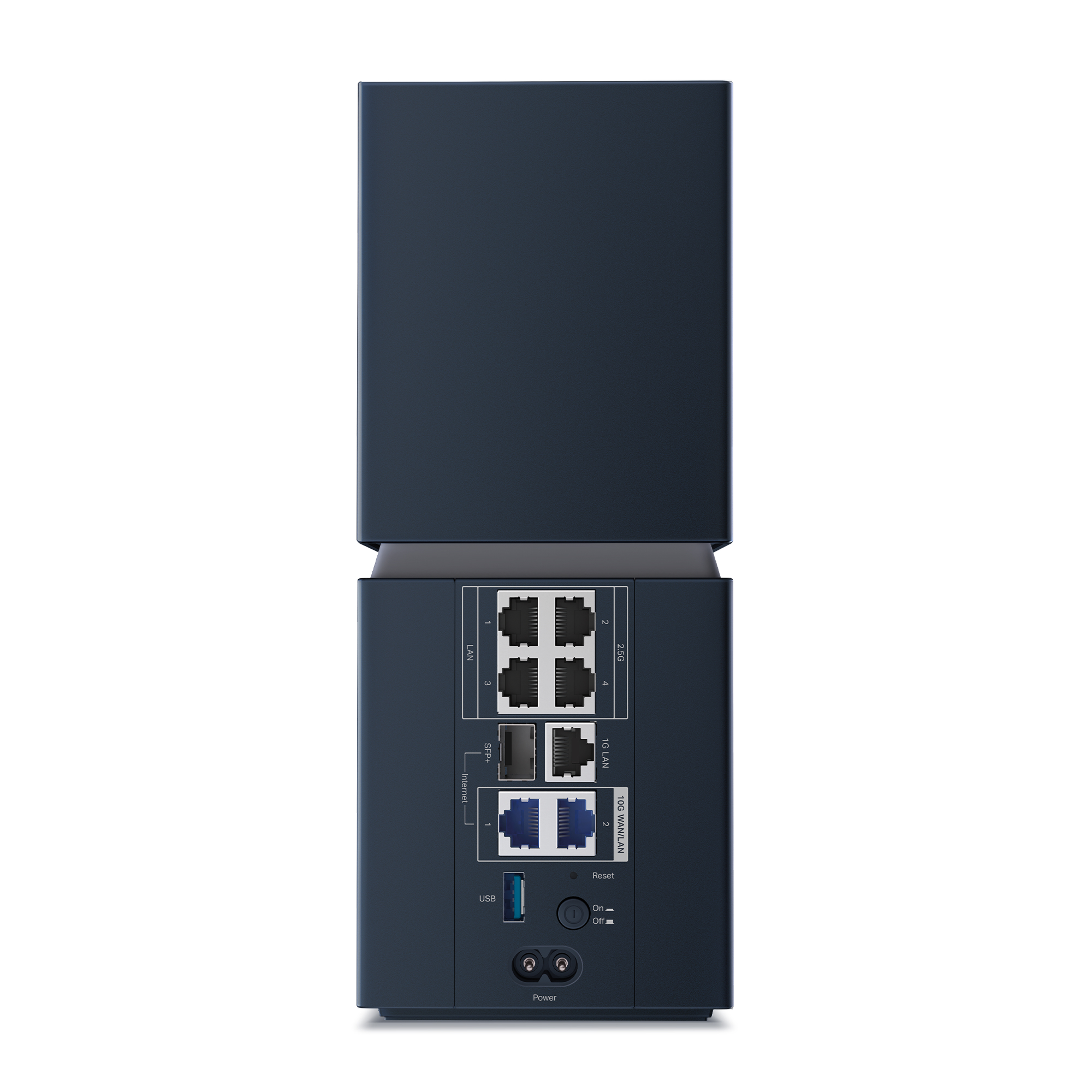
| 10 Gbps connections | One SFP+/RJ45 WAN/LAN combo and one separate RJ45 WAN/LAN port |
| Other Ethernet connections | Four 2.5 Gbps LAN ports and one 1 Gbps LAN port |
| USB | One USB 3.0 port, shown on the product page |
| Antenna system | 18 internal antennas, with three operating modes listed |
| Operating modes | Router, access point and EasyMesh agent |
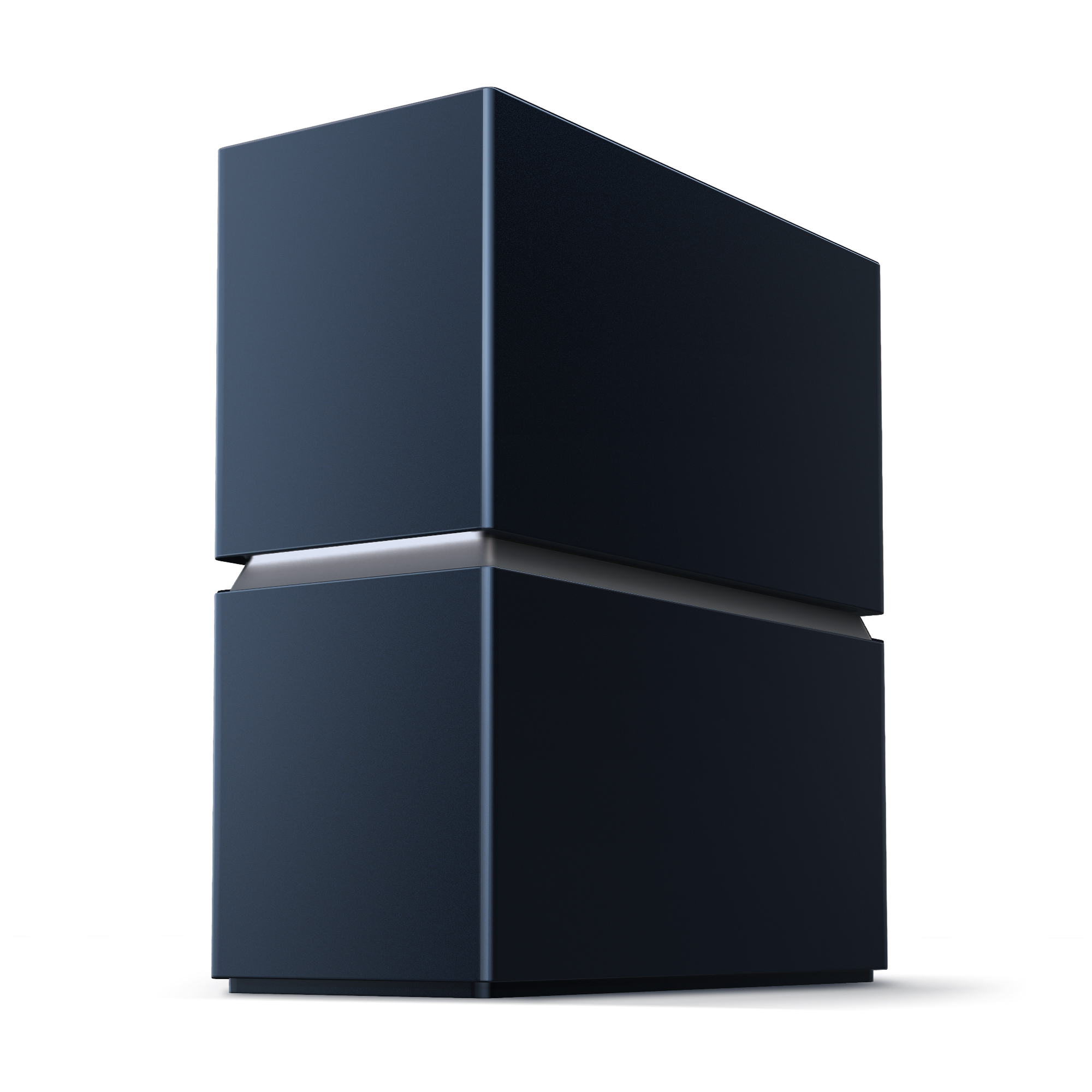
| Dimensions | 226 × 98 × 245.6 mm |
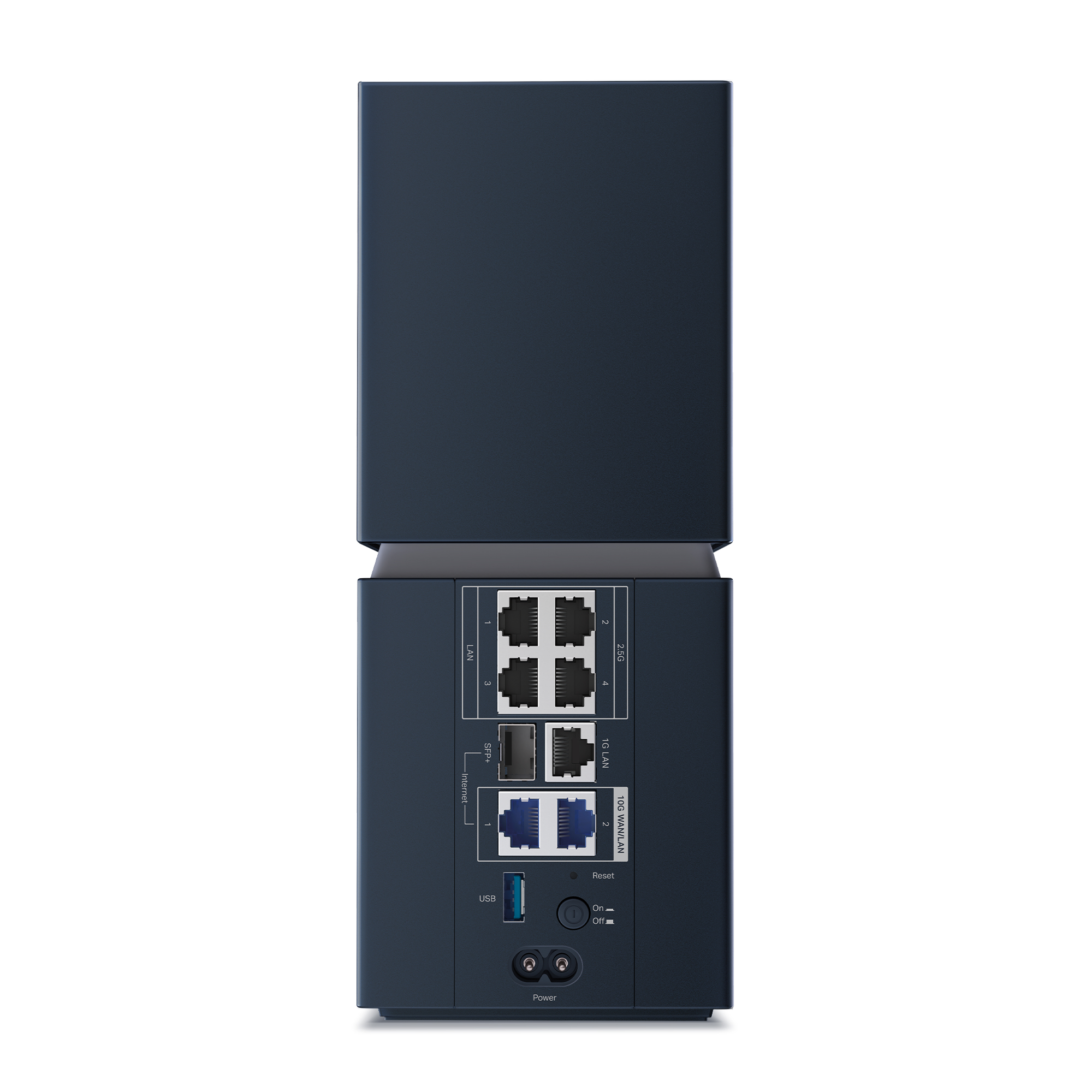
The combo port provides alternative physical connectors for one logical connection. It is not an extra pair of independent 10 Gbps ports: the datasheet says only one of its SFP+ or RJ45 interfaces can be used at a time. Plan the modem or ONT connection and the local high-speed connection accordingly.
TP-Link identifies Broadcom Wi-Fi 8 silicon in the launch announcement. That does not establish an exact CPU model, RAM capacity, encrypted VPN throughput or sustained routing benchmark. Those details should come from model-specific documentation or a properly described test, not assumptions about another flagship Archer.
Separate launch features from the firmware roadmap
StabilityEngine is TP-Link’s name for its group of reliability technologies. The dated launch release provides a useful boundary:
| Launch announcement status | Technologies named |
|---|---|
| Available at launch | Unequal modulation (UEQM), new modulation and coding schemes (MCS), 2×LDPC error correction, and non-primary channel access (NPCA) |
| Planned through over-the-air updates | Dynamic sub-band operation (DSO), enhanced long range (ELR), distributed resource units (DRU), and coordinated AP features Co-TDMA, Co-SR and Co-BF |
In practical terms, the programme covers adapting transmission to difficult links, finding usable airtime and coordinating multiple access points. The underlying Wi-Fi 8 mechanisms address different parts of that problem; a long feature list is not proof that every mechanism is already operating on a purchased unit.
TP-Link reports improvements of up to 33% in mid-to-long-range throughput and up to 24% under interference compared with Wi-Fi 7. These are controlled internal-test claims, not a promised uplift for your laptop. Ask which clients, firmware, distance and interference conditions were used. Buy for the functions available when you need them, and treat roadmap additions as conditional.
Existing clients work, but capabilities still matter
The listed standards include earlier Wi-Fi generations on the appropriate bands. An older phone or smart-home device can connect without becoming a Wi-Fi 8 device. TP-Link explicitly requires clients to support the corresponding new features to use them. Router-side changes may help the overall network, but they cannot add missing radio capabilities to an old client.
The 6 GHz band needs a compatible client, software and regional support. Apple’s guidance, for example, distinguishes devices with Wi-Fi 6E or later from those that use only 2.4 or 5 GHz. Check the exact wireless adapter rather than relying on a laptop’s age or a vague “Wi-Fi 6” label.
The three maximum PHY rates sum to 18,668 Mbps, rounded into the BN19000 class. That is an aggregate across radios. It is not a 19 Gbps internet connection or a guaranteed file-transfer rate for one device. Client stream count, channel width, shared airtime and protocol overhead all affect useful throughput. Our Wi-Fi 8 explainer provides more background on the generation change.
Plan the whole network path
Start at the ISP handoff. A multigigabit service needs compatible upstream equipment and a suitable connection to the router. The Archer’s ports cannot make a slower internet plan faster. Its SFP+ connector also does not automatically replace an ISP’s provisioned optical network terminal; confirm the handoff the provider supports.
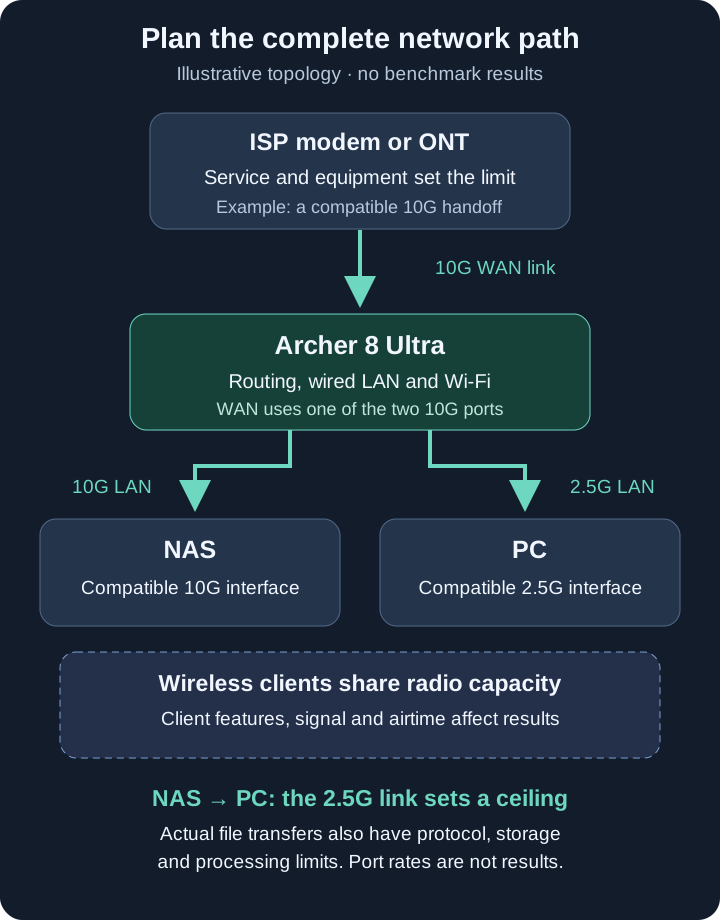
For local work, imagine a NAS on the remaining 10 Gbps port and a desktop on a 2.5 Gbps LAN port. The desktop’s link still caps that single transfer before accounting for storage and processing. Several clients may make useful aggregate use of a faster NAS connection, but a port inventory alone does not establish sustained switching or routing performance.
For a homelab with an existing firewall, access point mode is worth investigating before introducing another routing layer. Check which security, VPN and parental-control functions remain available in that mode. For multiple coverage points, verify the exact EasyMesh partner models and firmware. TP-Link’s mesh compatibility guidance distinguishes Archer/EasyMesh from Deco and Omada; sharing the brand does not make them one managed mesh.
Coverage claims need a floor-plan check
The launch release quotes up to 3,600 square feet of coverage, or 3,000 in the EU, and up to 200 devices. These are vendor maximum estimates. They do not describe 200 simultaneous high-bandwidth sessions or promise that one router will cover a house with reinforced floors.
Multi-Floor Mode is intended to reshape the antenna pattern for devices on different levels. Range Boost targets reception of weaker uplinks from distant or low-power clients. The useful test is whether your important devices retain a workable connection where they are actually used.
Follow basic placement guidance: choose an open location near the devices that need coverage, with ventilation and distance from large metal obstacles. The internal antennas cannot be repositioned like external antenna rods. If several rooms remain isolated by construction, compare additional coverage points and wired backhaul with spending everything on one central router. Our backhaul guide explains that design choice.
Management, security and ongoing costs
The announced Tether workflow includes NFC-assisted setup and guest connection. Aireal is the network assistant, with optimisation, diagnosis and self-healing functions promoted by TP-Link. Use automation as a convenience while keeping a record of configuration and firmware changes. It cannot repair an ISP outage or remove a physical obstruction.
The specifications list WPA3, guest and IoT networks, and both VPN client and server functions, including WireGuard and OpenVPN. Check the actual controls before relying on isolation: a separate network name and the required access restrictions are different things. Test that a guest cannot reach private services and that authorised smart-home control still works.
HomeShield combines free basic functions with paid advanced services. Identify the plan needed for the protection or parental controls you want; do not assume everything advertised is included indefinitely. WPA3 support is listed as a router capability and depends on compatible clients.
Using a VPN client on the router can tunnel selected devices through a supported provider, but neither the 10 Gbps port nor “hardware-level VPN” wording proves 10 Gbps encrypted performance. Check protocol-specific results and provider limitations. Keep administration restricted to the intended devices and apply updates appropriate to the exact regional hardware revision.
A practical upgrade decision
Before replacing a working network, write down the problem: a weak room, repeated call interruptions, slow NAS transfers or congestion at busy times. Those lead to different purchases. A faster client adapter, a cable or another access point may address the bottleneck more directly.
- Record a baseline. Compare wired internet access with Wi-Fi in the same busy period. Note the client, location, band and current firmware.
- Separate local and internet tests. A local file transfer helps investigate LAN limits; an internet test also includes the ISP and remote server.
- Test what matters. Check calls while other devices are active, movement between rooms and the smart-home devices at coverage edges.
- Compare complete costs. Include compatible clients, extra coverage points, subscriptions and any required switch or cabling.
- Keep a recovery option. Retain the previous configuration and a workable internet path while evaluating the new equipment.
An early adopter building a multigigabit network may find the port layout and developing reliability features interesting. Someone with a stable Wi-Fi 7 system should demand evidence that the upgrade improves their actual workload. Someone needing dependable coverage immediately should prioritise available firmware, supported clients and a proven layout over promised future features.
The Archer 8 Ultra introduces a serious early Wi-Fi 8 platform. Its value will depend on the combination you can buy and support locally: router, clients, placement and firmware. Judge that complete system, with realistic expectations about draft technology and a clear reason to upgrade.
Sources and image credit
The dated preorder announcement, official V1 datasheet and IEEE draft-status report provide the main launch references. The header and rear view are official TP-Link BN800 gallery images, credited to TP-Link. They are manufacturer product images, not TechDecode hands-on photographs. The topology SVG is original TechDecode artwork.