
For the self-hosting enthusiast, the homelab is a sanctuary of control, a place to experiment, learn, and reclaim your data from the cloud. Putting you in control of your data, however, is just one of the pros, and saving money by side-stepping cloud subscriptions is always awesome. If you're looking to supercharge your productivity and project management while keeping control of the server, then it's time to meet Tududi, a self-hosted task and project management application designed with the homelabber in mind.
What is Tududi and How Does It Work?
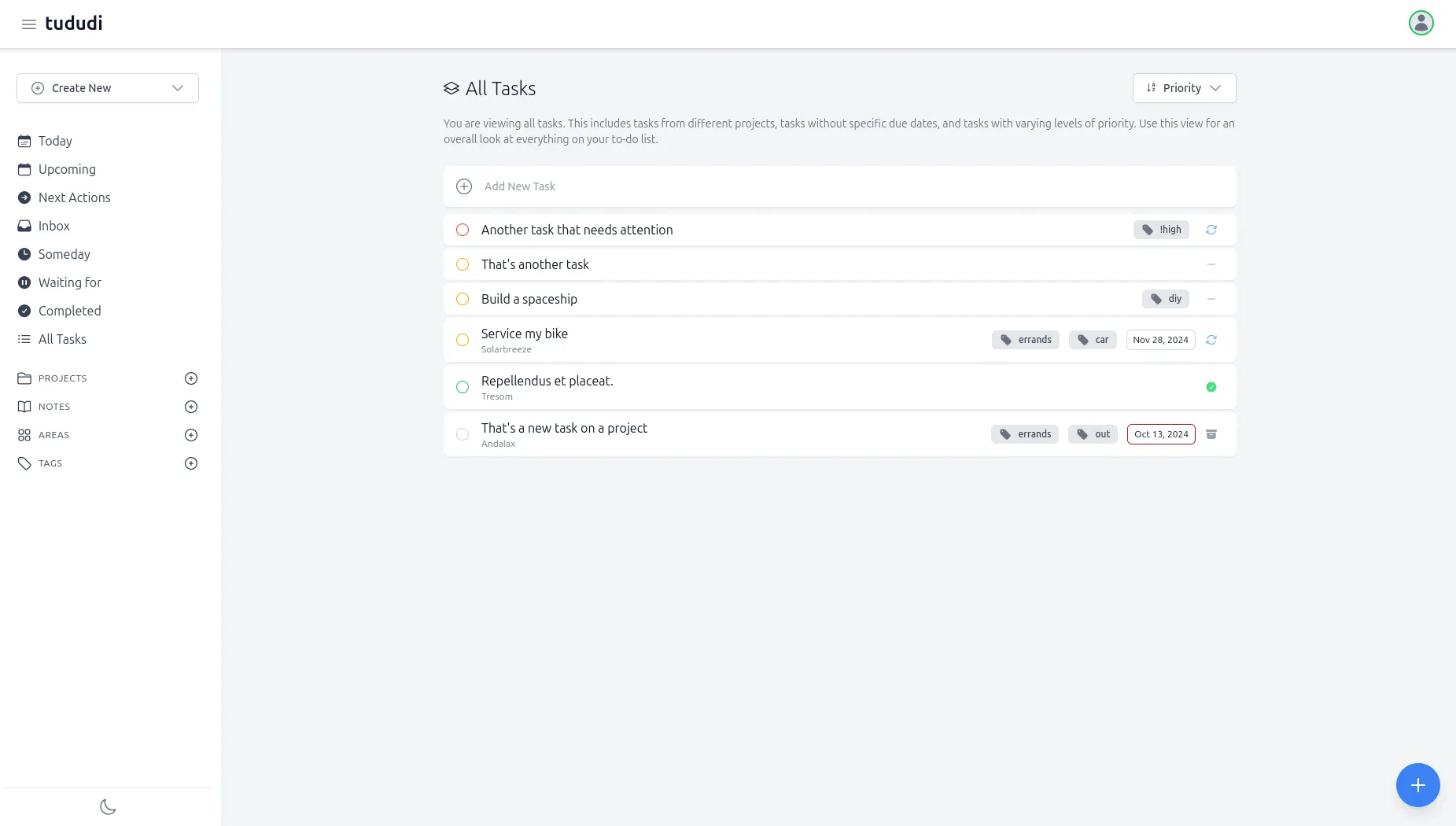
Tududi is an open-source, self-hosted web application built for efficient task and project management. At its core, it provides a structured environment to organize your to-do lists, manage complex projects, and keep track of deadlines. It operates on a hierarchical structure, allowing you to break down your work into logical components:
- Areas: Broad categories of your life, such as "Work," "Personal," or "Homelab Projects."
- Projects: Specific goals within an area, like "Deploy a new media server" or "Plan a vacation."
- Tasks: The individual, actionable items that need to be completed for each project.
This clear hierarchy helps to keep your tasks organized and prevents you from feeling overwhelmed by a single, massive to-do list. Tududi is a web-based application, meaning you can access it from any device with a web browser on your local network, or remotely through a deliberately configured VPN or HTTPS reverse proxy. A proxy by itself does not establish safe authentication or restrict who can reach the service.
Key Features of Tududi
Tududi packs a punch when it comes to features, offering a robust set of tools to manage your life:
- Hierarchical Organization: The "Areas > Projects > Tasks" structure provides a clean and logical way to manage your responsibilities.
- Smart Recurring Tasks: Create tasks that repeat daily, weekly, monthly, or on specific days of the week, perfect for building habits or remembering recurring maintenance.
- Telegram Integration: Receive daily digests of your tasks and create new tasks on the go directly from the popular messaging app.
- Tagging System: Use tags to further categorize and filter tasks across different projects and areas.
- Due Date Management: Easily see what's due today, what's upcoming, and what can be tackled later.
- Notes and Attachments: Add detailed notes and attach files to your tasks and projects to keep all relevant information in one place.
- Markdown Support: Format your notes and task descriptions with Markdown for better readability.
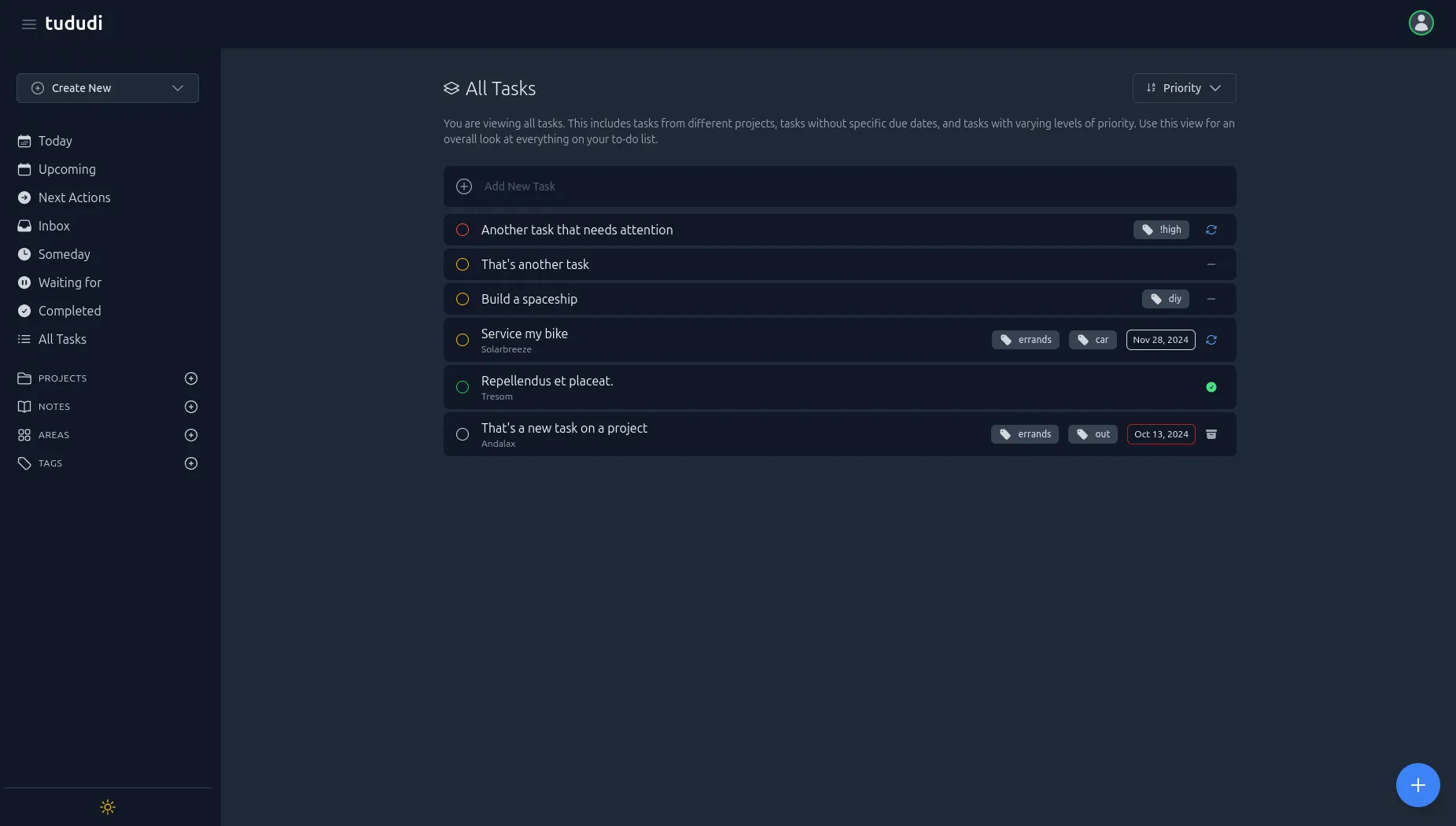
- Light and Dark Themes: Choose the interface that best suits your preference and working environment.
- Multi-language Support: Tududi is available in a variety of languages.
Why Host Tududi in Your Homelab?
Running Tududi on your own server offers several compelling advantages for the privacy-conscious and tech-savvy individual:
- Data Privacy and Ownership: You choose where the core task and project data is stored and who can access the server. Optional Telegram, email, calendar and AI integrations can send data to other services, so review them separately.
- No Subscription Fees: The self-hosted software does not require a subscription; the project also offers a hosted service. Your own hardware, electricity, storage, backups and maintenance still have costs. You avoid the recurring monthly or annual fees associated with many commercial project management tools.
- Customization and Control: As a self-hosted application, you have the freedom to customize and configure it to your exact needs. You can set up your own backup schedules and integrate it with other services in your homelab.
- Enhanced Learning: Deploying and managing applications like Tududi is a fantastic way to expand your homelab skills, particularly with technologies like Docker and reverse proxies.
- Offline Access: A reachable local server can continue serving local clients when the internet is down. Current releases also document PWA caching and queued changes, but a phone away from the server has different connectivity limits; confirm successful sync after reconnecting.
A Quick Guide to Installing Tududi
The official image is chrisvel/tududi. The stable release verified here is 1.9.1, published on 10 October 2026. Match the image tag to its documentation, because storage paths changed in the 1.2 series. Docker and the Compose plugin must already be installed on your host.
For a fresh local trial, create a directory containing compose.yaml and a private .env file. In .env, set TUDUDI_USER_EMAIL to the administrator email you will use, TUDUDI_USER_PASSWORD to a unique strong password, and TUDUDI_SESSION_SECRET to one generated secret. Generate that secret with this command and save the resulting value; it is not a command to leave inside the environment file:
openssl rand -hex 64That produces 64 random bytes represented by 128 hexadecimal characters. Keep the same secret when recreating the container and protect the file from other users. Do not commit it to a repository or include it in shared screenshots.
services:
  tududi:
    image: chrisvel/tududi:1.9.1
    restart: unless-stopped
    ports:
      - "127.0.0.1:3002:3002"
    environment:
      TUDUDI_USER_EMAIL: "${TUDUDI_USER_EMAIL:?Set the admin email in .env}"
      TUDUDI_USER_PASSWORD: "${TUDUDI_USER_PASSWORD:?Set a unique password in .env}"
      TUDUDI_SESSION_SECRET: "${TUDUDI_SESSION_SECRET:?Save a generated secret in .env}"
      TUDUDI_ALLOWED_ORIGINS: "http://localhost:3002"
      TUDUDI_TRUST_PROXY: "false"
      BASE_URL: "http://localhost:3002"
    volumes:
      - ./tududi_db:/app/db
      - ./tududi_uploads:/app/uploads
      - ./tududi_backups:/app/backups
Run the following from that directory. Missing required values stop Compose instead of silently starting with shared example credentials:
docker compose up -d
docker compose ps
docker compose logs --tail 50 tududi
Open http://localhost:3002 on the Docker host and sign in with the configured credentials. This is a localhost-only starting point, so another computer cannot reach it simply by substituting the server's LAN address. A remote Docker host needs a suitable tunnel or intentionally configured network access. Current startup scripts create the configured account; they do not require an unrelated first-run administrator-registration step.
Before storing important work, create a task and note, recreate the container without deleting its storage, then confirm that they remain. This is a verification readers can perform on their own instance, not a test claimed here.
Alternatives to Tududi
While Tududi is an excellent choice, the world of self-hosted project management is vast. Here are a few other popular alternatives you might consider for your homelab:
- Vikunja: A powerful and feature-rich open-source to-do list application with a focus on collaboration.
- Leantime: An open-source project management system that incorporates lean methodologies.
- Wekan: A free and open-source Kanban board application, similar in style to Trello.
- Taskwarrior: A command-line-based to-do list manager for those who prefer working in the terminal.
- Nextcloud Tasks: If you already run a Nextcloud instance in your homelab, its integrated Tasks app is a convenient and well-integrated option.
Conclusion
In the ever-expanding universe of self-hosting, Tududi shines as a simple, yet powerful, tool for taking control of your personal and professional productivity. Its straightforward installation, robust feature set, and commitment to data privacy make it an ideal addition to any homelab. By hosting it yourself, you not only gain a top-tier task management system but also enhance your skills and reclaim ownership of your digital life. Give Tududi a try, and you might just find the perfect co-pilot for your productivity journey.
Persistence, Upgrades and Remote Access
The current image stores its SQLite database in /app/db, uploads in /app/uploads and exported backups in /app/backups. The older /app/backend/db and /app/backend/uploads mounts belong to earlier versions. Follow the project's upgrade instructions and keep the existing host data directories; accidentally pointing a new container at empty directories can look like lost data.
Before an upgrade, keep a consistent database backup, uploads, exported backups and configuration outside the same host. Read the release notes and confirm the image version. Pulling an image does not update an already running container; it must be recreated with the intended version. Avoid deleting volumes as a routine update step.
For SQLite, the project provides consistent startup/migration backups, but these live with the database and have retention rules. They do not replace an independent recovery copy. Current per-user exports include task relationships and attachment content, but exclude passwords, sessions, API tokens and sharing permissions. A per-user export is therefore different from a complete instance restore.
Changing the bootstrap environment password is not a guaranteed reset of an existing account: the current user-creation script leaves an existing password unchanged unless its explicit update-password option is used. Prefer the documented account-password flow, and retain the session secret and any separate integration encryption keys through a move.
For a reverse proxy, set BASE_URL and allowed origins to the actual external HTTPS address. Configure TUDUDI_TRUST_PROXY to reflect the trusted proxy path, and prevent clients bypassing that proxy to forge forwarding headers. If the proxy runs in another container, its localhost refers to that container; arrange a shared private Docker network or a documented host route. The local example does not install a proxy or certificates.
Capturing Tasks through Telegram
Create a dedicated bot through Telegram's BotFather, then use Tududi's Telegram settings to configure its token, chat ID and allowed users. Settings names can vary by release. Restrict who can send commands, choose the desired digest schedule, and test with a non-sensitive task before relying on mobile capture.
A bot token is a credential: keep it private and revoke it if exposed. Messages sent through Telegram pass through Telegram rather than staying entirely in your homelab. The local server also needs connectivity for the integration, even if the core task application works during an internet outage. Telegram setup is optional and is not enabled merely by running the Compose file.
A Useful Homelab Task Workflow
The Areas, Projects and Tasks hierarchy works well for turning a vague goal into manageable actions. For example, use a Homelab area, a “Move the media server” project, and separate tasks to check storage, back up configuration, schedule downtime and verify playback afterwards. Add relevant notes without putting passwords into task descriptions.
Capture an idea in the Inbox, clarify the next action and assign a due date only when it represents a real deadline. Tags can connect related tasks across projects, such as all maintenance jobs needing downtime. Review Today and Upcoming instead of making every task urgent; keep low-priority ideas in Someday until they become actionable.
Recurring tasks are especially useful for checking backups or renewing certificates. Decide whether recurrence should follow the planned due date or the completion date: a delayed maintenance check can produce different schedules under those rules. Verify one recurrence cycle and notifications before using it for an important reminder.
Choosing an Alternative
Tududi remains an appealing choice for the combination of personal organisation and server control. The alternatives listed above are worth considering according to your existing workflow, rather than a fixed price table or a claim that one app is best for every user. If you already rely on Nextcloud, its Tasks app may avoid another system to maintain; if you prefer a terminal workflow, Taskwarrior is a different kind of fit.
Try a realistic small project before migrating all your tasks. Check recurring behaviour, phone access, sharing permissions, export/restore and the amount of maintenance you are comfortable owning. A tool earns its place by helping you finish work, not simply by adding another container to the homelab.
Visit the official Tududi website for project information and current documentation.