For the self-hosting enthusiast, the homelab is a sanctuary of control, a place to run your own services and manage your own data. If you're looking to bring that same level of ownership to your project management, then it's time to get acquainted with Focalboard. This open-source, self-hostable powerhouse offers a flexible and feature-rich alternative to popular platforms like Trello, Asana, and Notion, putting you firmly in the driver's seat of your productivity.
This guide explains its board workflow and the decisions involved in hosting it. There is an important current limitation: the standalone repository warns that it is not maintained. It has moved to the Mattermost community organization; being available to download does not establish ongoing security support. Consider that warning before adopting it for sensitive work or exposing an installation to the internet.
What is Focalboard and How Does it Work?
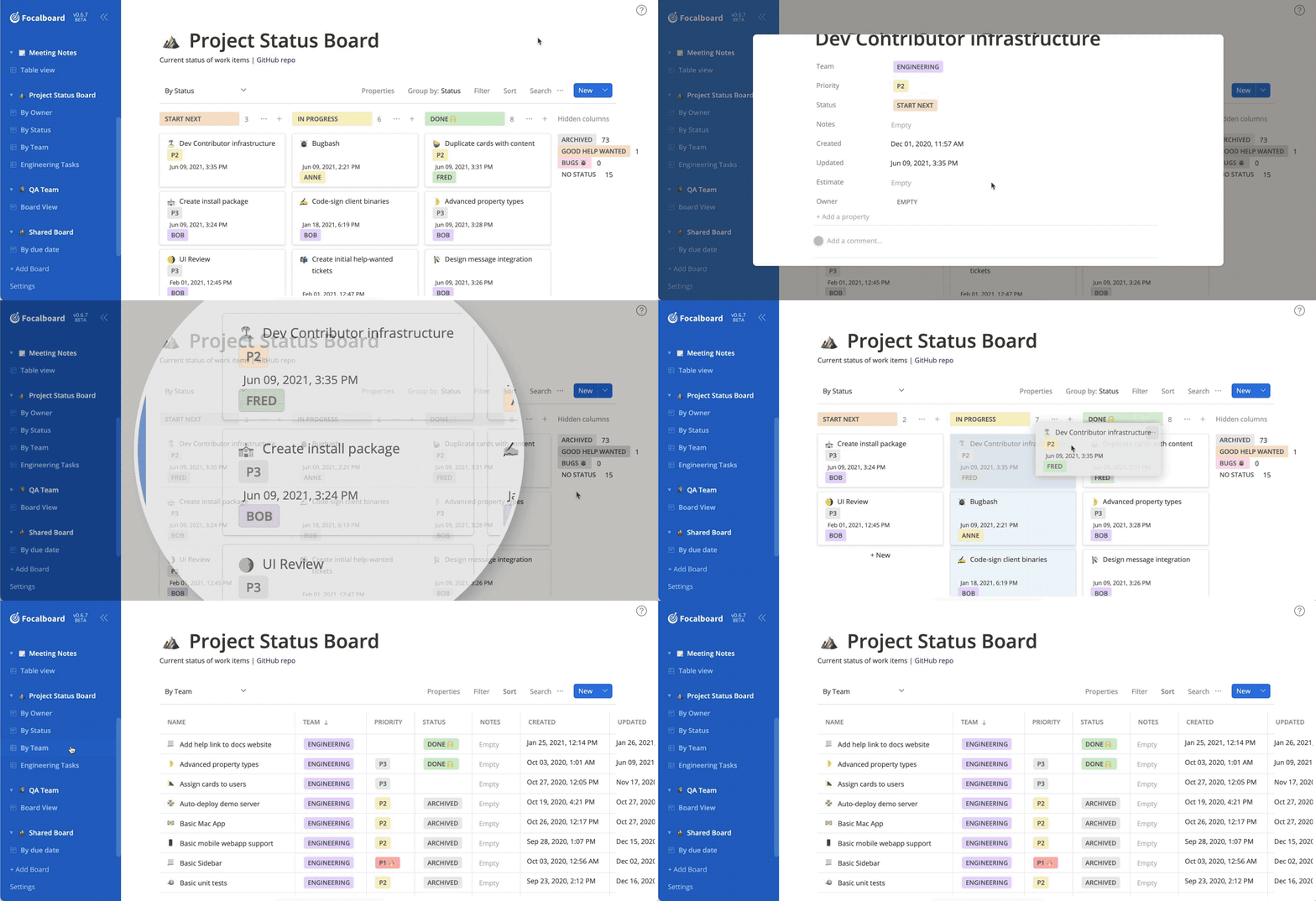
Focalboard is a project management tool designed for individuals and teams to organize, track, and manage their work. At its heart, it utilizes the Kanban methodology, a visual system for managing workflow. You create boards, which act as canvases for your projects. On these boards, you create cards, which represent individual tasks. These cards are then moved across different columns that you define, typically representing stages of a workflow, such as "To Do," "In Progress," and "Done."
This intuitive drag-and-drop interface provides a clear and immediate overview of your project's status, helping you and your team stay aligned and focused on what matters most.
The Feature-Packed World of Focalboard
Focalboard comes brimming with features that make it a versatile tool for a wide range of use cases:
- Multiple Views: Boards offer views such as Kanban, table, calendar and gallery. The initial view depends on the template you choose; changing a view lets you examine the same cards from another perspective.
- Customizable Templates: Get a head start on your projects with a variety of pre-built templates for things like content calendars, project roadmaps, and meeting agendas. You can also create and save your own templates for recurring workflows.
- Rich Card Details: Each card can hold a wealth of information, including descriptions, checklists, attachments, comments, and custom properties. This allows you to keep all relevant information in one place.
- Real-Time Collaboration: The multi-user Personal Server lets people work on shared boards. The user guide describes changes being saved immediately and visible to other users; do not assume standalone notifications match those of the Mattermost plugin.
- Capacity You Manage: Self-hosting avoids a hosted plan's per-user subscription model, but storage, server resources, backups and administrative work still limit the deployment.
The Mattermost Connection: Supercharging Your Collaboration
The original appeal of integrating task boards with Mattermost remains easy to understand: a conversation can link to a card containing the specification, owner and next action, keeping the discussion connected to the work.
However, Personal Server and Mattermost Boards are separate deployment choices. Personal Desktop is a single-user application; Personal Server is the standalone multi-user application. The Mattermost integration lives in the separate Boards plugin repository. Installing the standalone Docker container does not automatically add boards, chat notifications or channel integration to a Mattermost server.
Match the plugin release to your Mattermost version and read its maintenance information before planning a team workflow around it. Some documentation describes older releases where Boards was bundled with Mattermost. Those historical instructions do not prove that a current installation includes a compatible plugin.
Self-Hosting Focalboard in Your Homelab: Quick and Easy Methods
A container provides a convenient way to evaluate the standalone server, but installation is only part of operating it. Decide where its persistent data will live and who will maintain it before inviting other users.
- Docker: The upstream Docker README documents building an image, mounting a persistent volume, and optional Compose configurations with Nginx and PostgreSQL. A previously published image is also referenced by the project. Check the image version, architecture and provenance rather than assuming a moving
latesttag is a newly maintained release. - Native Installation: For those who prefer a more traditional setup, Focalboard can also be installed directly on a Linux server. The process involves downloading the appropriate binary, creating a systemd service to manage the application, and configuring a web server like Nginx as a reverse proxy.
Key Considerations for Your Self-Hosted Focalboard
Before you dive in, here are a few important points to consider for a smooth self-hosting experience:
- Database Choice: By default, Focalboard can use a simple SQLite database, which is fine for personal use or small teams. The administrator guide also lists PostgreSQL and MySQL database types. Verify support in your chosen release and the database backup procedure; changing engines alone does not establish a particular performance or user-capacity guarantee.
- Reverse Proxy and Security: It is highly recommended to run Focalboard behind a reverse proxy like Nginx or Traefik. This allows you to easily manage SSL/TLS certificates (using tools like Let's Encrypt) to secure your installation and access it via a custom domain name.
- Backups: As with any self-hosted service, regular backups are crucial. Back up the database, uploaded files and configuration together. The user guide explicitly warns that a board archive does not include image and file attachments, so an export from the interface is not a complete disaster-recovery backup.
- Resource Allocation: Focalboard is relatively lightweight, but you'll need to consider the resources (CPU, RAM) you allocate to its container or virtual machine, especially as the number of users and the complexity of your boards grow.
Conclusion: Your Projects, Your Way
Focalboard empowers you to take back control of your project management. Its open-source nature, combined with the ease of self-hosting, makes it an ideal addition to any homelab. Its intuitive interface and flexible views explain the appeal for personal tasks and team projects. Balance that original favorable assessment against the standalone maintenance warning and the separate compatibility requirements of the Mattermost plugin.
By taking a little time to set up Focalboard in your homelab, you're not just deploying another service; you're investing in a more organized, efficient, and self-sufficient way of working. Start with an isolated trial board, verify persistence and recovery, and decide whether you are comfortable taking responsibility for the software's maintenance.
Visit the official Focalboard website
A Local Docker Trial with Persistent Storage
The following Compose example adapts the project's documented image and persistent directory for a local evaluation. It is not a claim that the image is actively supported. Review the release you select, and pin a version or digest once you have established which artifact you intend to retain.
services:
  focalboard:
    image: mattermost/focalboard:latest
    restart: unless-stopped
    ports:
      - "127.0.0.1:8000:8000"
    volumes:
      - focalboard-data:/opt/focalboard/data

volumes:
  focalboard-data:
The upstream Dockerfile uses /opt/focalboard as its working directory. Its server configuration puts SQLite at ./data/focalboard.db and attachments at ./data/files, so the mounted directory is intended to retain both. The development configuration elsewhere in the repository uses different paths; do not replace the image configuration with that file without checking every path. If you change the database or files directory, ensure those locations are included in the backup.
The host binding restricts published access to the Docker host's loopback interface. Open http://localhost:8000 in a browser on that host. A browser on another computer needs an explicitly planned access route; its own localhost address is not the server. A reverse proxy running in another container needs a shared Docker network and the container's service address rather than that container's localhost.
Before relying on it, create a sample card with a non-sensitive attachment, restart and recreate the application container while retaining its volume, and check that both remain accessible. Stop the application before copying a SQLite-based data directory for a simple consistent backup. Then restore a copy into an isolated trial installation and verify the attachment as well as the card. Never use volume-removing cleanup commands on your only copy of the data.
Evaluate the Workflow Before Committing Your Data
A useful trial is a small homelab maintenance board with Status, Priority and Next Review properties. Use a board view to group work by status and a table view to inspect dates. A card template could contain the service name, configuration location, maintenance notes and a restore checklist. Keep passwords and recovery keys in their appropriate secure storage rather than a shared task card.
Dragging a card between columns changes its group-by property. A sorted view may then reposition the card according to its sort rule; that does not mean the move failed. Likewise, filtering a view can hide a completed task without deleting it. Understanding these differences helps readers use several views of the same work instead of creating duplicate boards for each display.
Finally, examine sharing and export behavior before adoption. The documented public-sharing option makes a board accessible to anyone holding its link, and regenerating the token invalidates old shared links. Check which sharing controls your release enables. Compare any alternative against the views you actually use, its current maintenance policy, attachment export, access controls and a proven restore path. An unsupported RAM estimate or a longer feature list is a poor substitute for those checks.